I’m (sort of) new to Aqara (but my checking account would disagree with me) LOL.
I’ve always wanted to have a panic button that could set off a couple of loud alarms in my house. When a smart power plug is switched on with the push of a smart switch, it activates a very loud DC siren.
All it took to get this working was a button switch, A/C Smart remote control plug, and a AC to DC transformer that matched the voltages of my siren. A little soldering, wire strippers, and electrical tape and it works great. One click of the button turns on the garage siren. A double-click turns it off.
I even grabbed another set to have another siren downstairs.
Obviously, given how smart plugs work, the sirens can be configured to come on in a variety of ways, not just by button click.
One step further, I added another button that starts blairing 2002’s Dope Nose by Weezer to a pair of iPod Mini’s. This should act as an ingress deterrent also. Or, at least,wakethe neighbors. Figuring out automated emergency dialing is next.
Kudos to Aqara and how well Matter works. Much more to do.
19 Likes
Hello, thank you for such a detailed description. For using automation 2.0 and other questions, go to the “documentation” section. This section contains my 2.0 lessons. As always, I recommend carefully reading the explanations for lesson 1 to understand the 2.0 algorithm and make working automations. Automation 2.0 Tutorial Collection - Lesson 1 report
12 Likes
I’m excited to read it. The confusion that I have now is whether to do my automations in HomeKit or in Aqara. Or a mix of both. All my cameras will likely remain in Aqara for the highest resolution. I had planned on using HomeKit exclusively but maybe that’s a mistake and I should go 100% with Aqara. Decisions need to be made. 
7 Likes
The native Aqara app gives you more options, but it’s your choice. If you have any questions, write, I’m always ready to help and explain.
6 Likes
Even better than a button would be just having to shout “Aqara, Red Alert!” for the hell to break loose. 
5 Likes
If you configure a shortcut (on iOS, in the Shortcuts app) named “Red Alert”, then you can shout “Siri, Red alert!” and she will run the shortcut (and the shortcut can activate an Aqara scene).
Btw, remember to allow the shortcut to run on a locked device (in the shortcut settings)
7 Likes
Thanks. I didn’t even know you could add an Aqara scene to HomeKit. I haven’t done enough education on that yet. I figured Aqara and HomeKit were completely separate entities but exposing Aqara scenes to HomeKit sounds awesome.
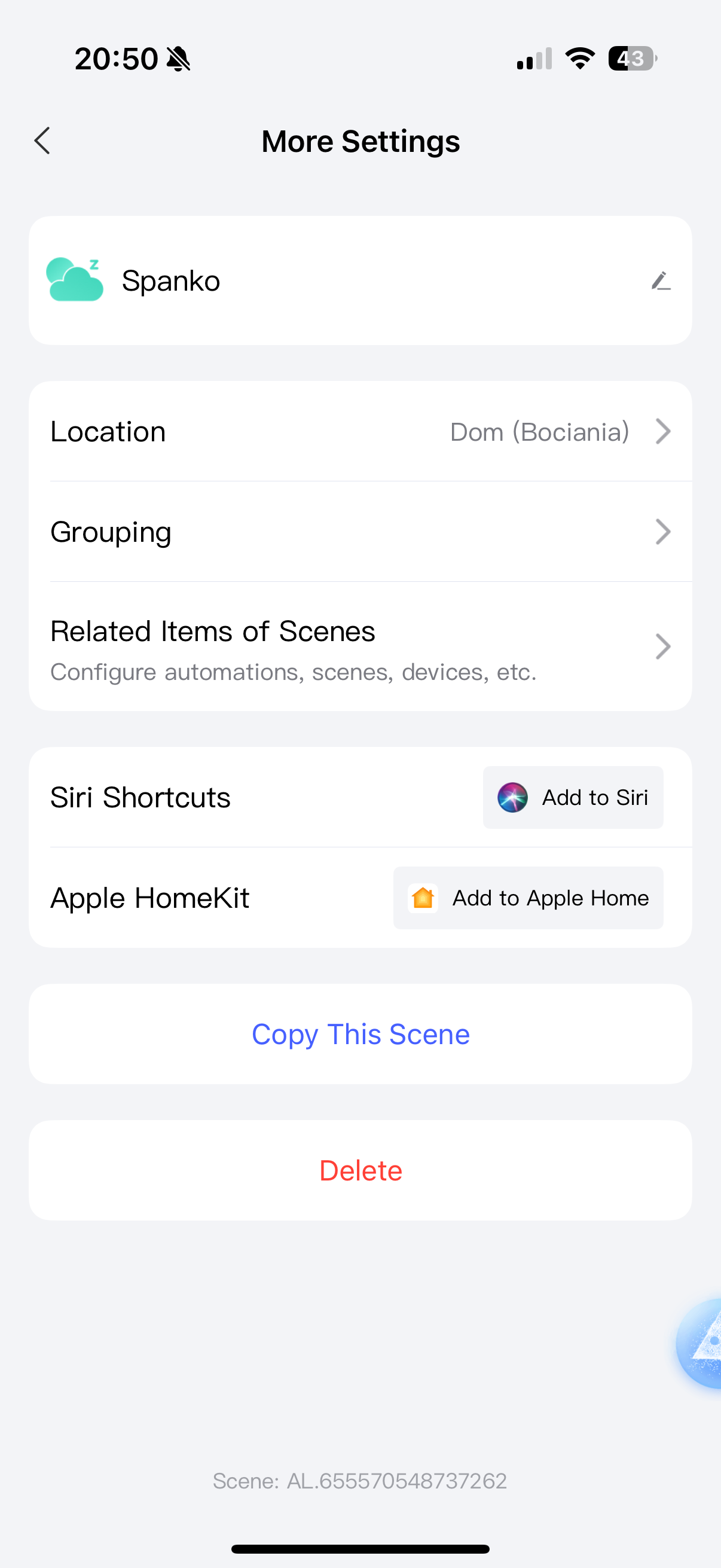
Yes, when you edit the scene, you can click on three dots and you have two buttons: “Add to Siri” and “Add to Apple Home”.
When you click the first one, it will an a Shortcut action and you can use it in Shortcuts or just tell Siri to set the scene. Shortcuts are automatically synced with all Siri devices and telling “Hey Siri, ” will activate it.
But devices without the Aqara app (like a HomePod) will refuse to run it, and will tell you that you need to try again on your iPhone.
When you click “Add to Apple Home”, you will see the scene in your Apple Home app. Then you can use it from here, but you will have to add the Shortcut manually (add new Shortcut, search “scene”, there will be an action with Apple Home icon).
If you create a Shortcut that triggers an Apple Home scene, then all devices with Siri (like HomePods) will be able to run it, even if they don’t have the Aqara app.
4 Likes
Thanks. It’s good to know these limitations and workarounds. I’m running a M3 hub and an Apple TV thread border router but I have some HomePod minis also. I almost never use Siri on the phone but I do use it on my HomePod minis so this is definitely helpful. I need to spend more time in these forums because I suspect there’s a lot to learn here.
2 Likes
One more - I believe for the Shortcuts to work, you need to enable personal requests in Apple Home, then Siri will sync your shortcuts and recognize your voice.
And there is a Siri bug - the Siri sometimes will recognize the Shortcut name even after you delete the Shortcut and it’s almost impossible to make her unlearn it. I once created a shortcut name “Thanks for nothing” where I programmed a random insult back, and when I deleted it, saying “Siri, thanks for nothing” meant you get a reply “Sorry, there was a problem”.
So be careful with names that are also some other arbitrary phrases or instructions for Siri.
2 Likes
Hi @lexerama if you have an Apple music account then you can play also alarm sounds over your Airplay speakers 
I do have an Apple Music account that I rarely use. I need to look into that more. I just have it set to very loudly play DopeNose when I hit the panic button but I’d like to play an alarm. BTW, I’m using the 5 button Onvis Smart Button as a trigger to a bunch of my automations. I picked up a half dozen IKEA buttons this week too but I’ve only used one of them so far to control the upper and lower lights in house. So far, they work great though but you only get two buttons with the three actions each.
1 Like