!! Help needed !! I bought two Aqara U400 locks so I could use the UWB features. I am having issues getting it to connect to Apple Home. Updated the U400 Locks to the latest firmware. It connects to Aqara Home just fine. I am using M3 Hub to connect with Thread and Matter. I have a U300 Lock with no issues connecting via Matter and also a T2 bulb that is connected via Matter. The M3 Hub is connected to Apple HomeKit but not through Matter. I removed the M3 Hub from HomeKit and killed 47 devices and automations, just to see if that was the issue (What a nightmare, wife wasn’t happy either) I tried to connect the M3 Hub via Matter, while it was disconnected but it wouldn’t pair to Apple Home! I was able reconnect the M3 Hub natively to HomeKit and restore ll the devices. I have eero Pro6E as my wifi access points. I checked to make sure that IPv6 is enabled. Moved U400 Lock closer to the hub to see if that was the issue and that didn’t work. Even changed the M3 Hub to ethernet to make sure it had a good connection. I have switched the Apple Home Hub from HomePod 2nd Gen to two different HomePod Minis thinking that was the issue. I am using an iPhone 17 Pro Max running iOS 26.2. I am at a loss as to why these two locks will not connect to Apple Home.
Dear Users,we’re sorry for any inconvenience you may have experienced while binding the U400 to Apple Home. Below are some recommended checks and steps to help ensure a smooth binding process.
Check points:
Device and Software Version:
- Please make sure you have a Thread-enabled Apple Home hub running the latest software, such as:
-
Apple HomePod (2nd generation)
-
Apple HomePod mini
-
Apple TV 4K (2nd generation)
-
Apple TV 4K (3rd generation, Wi-Fi + Ethernet)
- iPhone 11 and later, excluding iPhone SE (2nd and 3rd generation) and iPhone 16e, running iOS 18.5 or later.
- Apple Watch Series 6 and later, excluding Apple Watch SE, running watchOS 11.5 or later.
- For the best experience, we recommend updating to iOS 26 or later and watchOS 26 or later.
Binding Environment:
- Make sure IPv6 is enabled on your home Wi-Fi network. IPv6 is required for Matter connections.
- Make sure your phone and Thread Border Router are under the same Wi-Fi network.
- Bluetooth must be enabled during the binding process.
- Keep the distance between the lock and the Thread-enabled Matter controller within 5 meters. If there are obstacles such as walls, keep the distance within 3 meters.
- Make sure your Apple Home hub has already been added to the “Home” you want to bind the U400 to.
Apple Home Binding Procedure:
We recommend binding Apple Home as the first ecosystem. If you would like access to more lock settings, you can also bind the lock to Aqara Home later via Bluetooth by scanning the Aqara MagicPair code.
- Reset the door lock by pressing the Reset button for 5 seconds.
- After the reset is complete, press the Set button once on the lock to enter pairing mode.
- Open the Apple Home app, tap “Add Accessory”, and scan the Matter Pairing Code on the lock.
- If pairing fails:
- Please repeat the steps above.
- If it still doesn’t work, reset your Apple Home hub (for example, a HomePod mini), then add it back to the Home you want to use. Wait until the HomePod Mini shows “Not Playing”, then try the binding steps again.
We hope this helps and please let us know if you need any further assistance.
After Setting up your Smart Lock U400 in the Apple Home app, if you want to bind your lock to the Aqara Home app and connect a Hub M3. Here’s the procedure.
Check Points:
- Bluetooth must be enabled during the binding process.
- Make sure your phone and Thread Border Router(e.g. Hub M3) are under the same Wi-Fi network.
- Keep the distance between the lock and the Thread-enabled Matter controller(e.g. Hub M3) within 5 meters. If there are obstacles such as walls, keep the distance within 3 meters.
- Make sure the Hub M3 has already been added to the “Home” you want to use in the Aqara Home app.
- Your Hub M3 is running the latest firmware.
- Your Aqara account region is set to one of the supported regions: United States, Canada, Singapore, Australia and New Zealand.
(In Aqara Home app, go to “Profile”> Settings > Region to change your environment)
Binding to Aqara Home app via bluetooth:
- Press the Set button once on the lock to enter pairing mode.
- Open the Aqara Home app, tap “Add Accessory”, find Smart Lock U400 under Smart Door Lock, and scan the Aqara MagicPair code on the lock.
- Follow the app instructions to complete the setup.
Add to an Aqara Hub (e.g. Hub M3)
- Make sure the Hub M3 is already connected to your Home in the Aqara Home app.
- Open the U400 device page and tap the cloud icon.
- Tap “Connect”, then select “Join Aqara Home through sharing.”
- Select “Apple Home”, then tap “Enter Matter Pairing Code.”
- In the Apple Home app, go to U400 Settings and tap “Turn On Pairing Mode.”
- Manually enter the generated Matter pairing code into the Aqara Home app and tap “OK.”
- Press the Set button once on the lock and select Hub M3.
- Follow the app instructions to complete the binding.
Note:
The Matter pairing code generated in the Apple Home app must be manually entered in the Aqara Home app to bind the Aqara Matter Controller. Copying and pasting the code will not work. We are aware of this issue and are currently working on a fix.
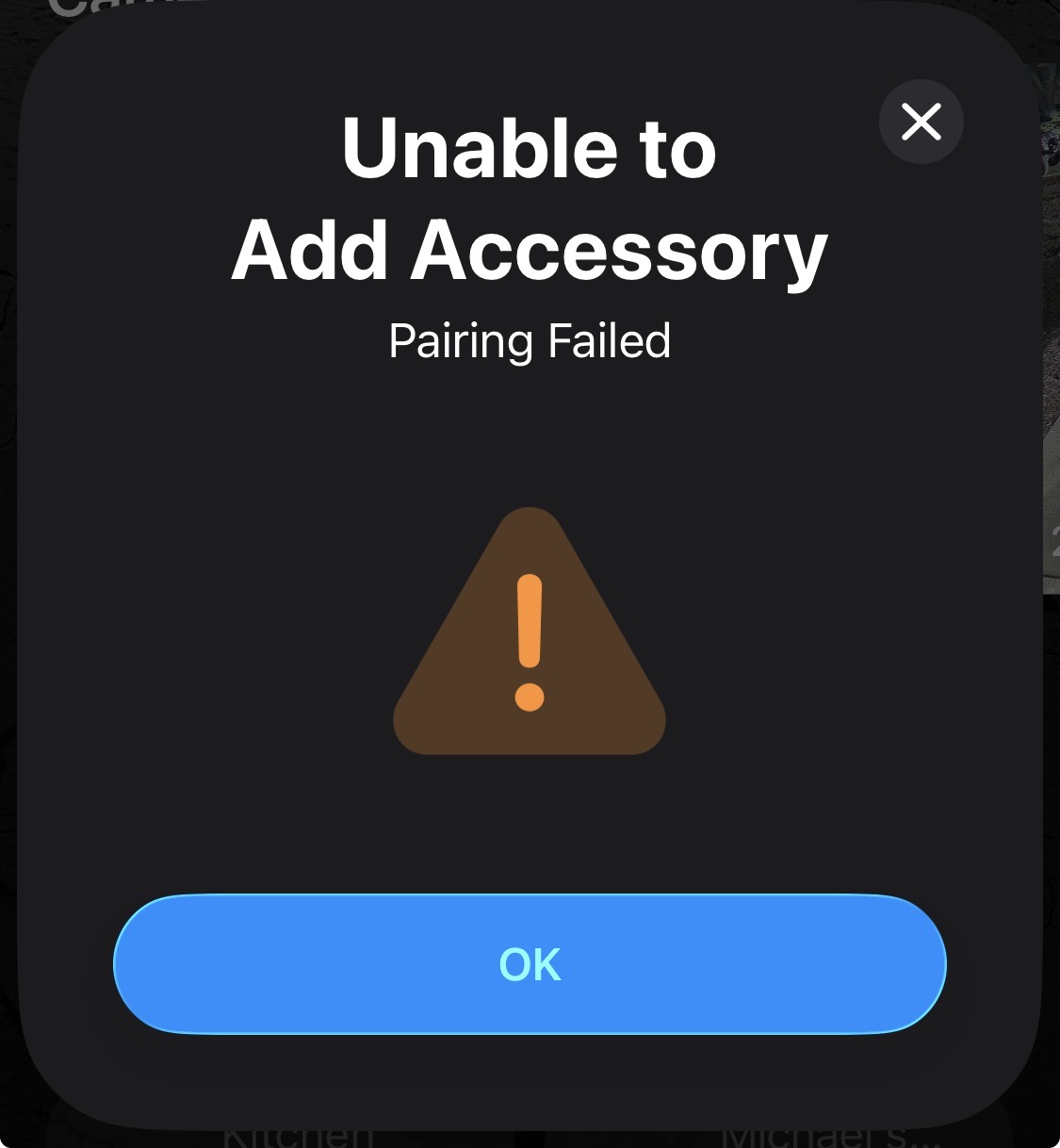
as stated I have tried multiple hubs, Apple TV 2nd gen, HomePod 2nd gen and mini. they are all updated to version 26.2 (23K54). iPhone 17 on 26.2, IPv6 is enabled. Tried to connect the U400 directly to Apple Home before Aqara but immediately gives an error
I then tried to enter the code instead of the QR code and got this error
Dear user, we’d like to confirm a few things with you to better understand the issue:
• Did you press the Set button on the Smart Lock U400 before scanning the Matter pairing code?
• Before scanning the Matter QR code, had you already connected the Hub M3 to the Smart Lock U400 in the Aqara Home app?
Yes I did and it connects to the Aqara Home without issue. It’s just when I try to connect to Apple Home. I have a U300 Lock via Matter and no issues with that one.
Dear user, I’ll suggest resetting the door lock by pressing and holding the Reset button for 5 seconds, then following this order:
- Bind the lock to the Apple Home app first
- Bind it to the Aqara Home app via Bluetooth
- Finally, connect it to the Hub M3
For the detailed binding procedure, please refer to the instructions I shared above.
Based on our experience, the possible causes may include:
-
When binding the lock to the Aqara Home app via Bluetooth, please scan the Aqara Magicpair Code and meanwhile, cover the Matter pairing code on the lock with your fingers to avoid accidentally scanning the wrong QR code.
-
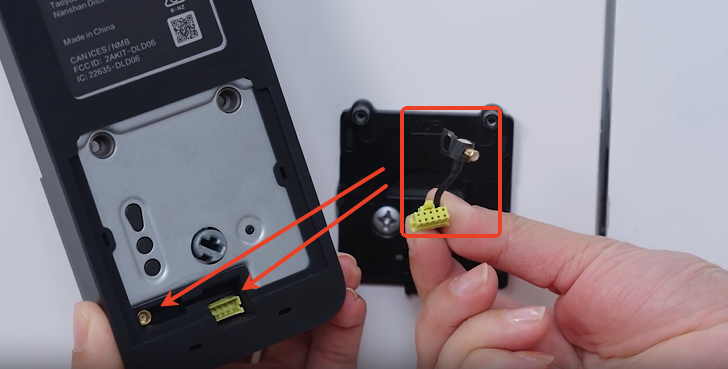
When binding the U400, please ensure the lock is properly installed, and that the front lock antenna and cable are securely connected to the inner (rear) lock.
(Please do mind that during installation, please handle the front lock antenna gently, avoid excessive bending or pulling of the antenna, and make sure the antenna is correctly connected to the lock body. When removing the antenna, please do not pull on the wire itself—instead, you can remove it by pulling the tape sleeve attached to the tip of the antenna.)
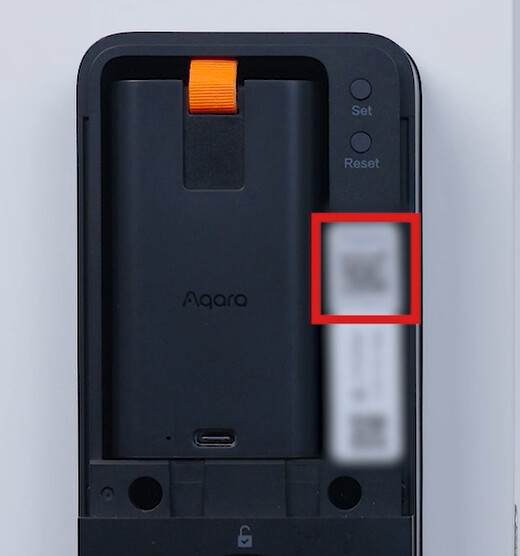
Reset the lock then go into iPhone-settings-general-matter accessories to see if you see the u400 listed. If it is delete it.
Then go back to the lock and press set to get it started on the pairing process. Go back to the Apple home app-add accessories and scan the matter code on the lock. It should start and allow the pairing to complete.
Once you are set with Apple home you can then go ahead and add it to Aqara. If the setup process asks for a matter code go into the lock settings in Apple home and scroll to turn on paring mode-copy code and use that to add it to Aqara.
Please feel free to reply if you have issues and post pictures or videos of what’s going on as they are very helpful.
One problem is that the instructions are not clear. When I press set on the lock, it tells me to press set on the lock to enter pairing mode. But I just pressed it. If I press it again, it says it again. So is it in pairing mode or is it not in pairing mode?
as far as iPhone general settings, there are no matter settings anywhere. So I’m not sure what the last post was all about.
Pairing mode is activated immediately after you press the Set button. If you hear a voice prompt after pressing the button, the lock is in pairing mode and ready to connect.
I fought the same issues with the U300’s I just installed. Best way I found to get it to bind is to add it to Apple Home first. Once I got it bound there I was able to bind it to Aqara home and then select the hub section and select your hub. I did have to pull my Apple TV 4k out of the junk drawer and make sure it showed up as a hub in Apple Home first.
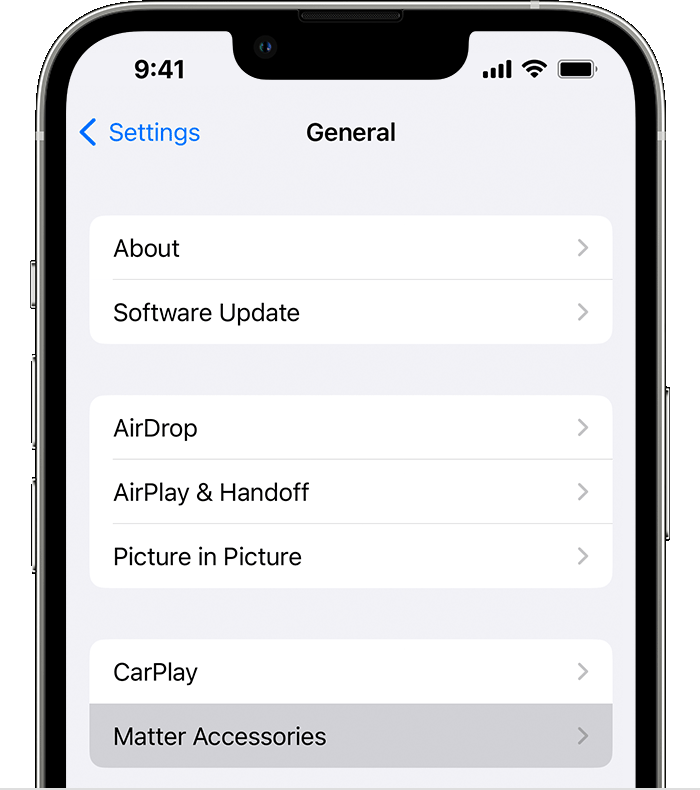
This is what I was referring to with matter accessories in settings. If you don’t see the lock in there or the matter section at all then the lock is not stored and you should be able to reset and start with adding through the Apple home app.
Im not sure if you resolved your issue, but I had the same thing happen to me and nothing I did would fix it. The one thing I noticed though was if I created a new Apple Home, I could see and add the lock to it no problem. I just couldnt add it to my existing home no matter what steps I took. Finally, I tried to add it with a different device (my ipad instead of iphone) on my existing apple home, and voila, it worked. I have no idea why it didnt work with my phone. they were both on the same network, nothing else changed… strange.
Right, the lock is not stored. Adding to apple home is what I am trying to do with no success. I have reset the lock, reset the HomePod, etc. This is extremely frustrating, I could spend hours or days trying to figure this out never knowing whether my lock is just defective.
I wish the response was “yes that is a bug and we will fix it”
I just read a post where someone did a return/replace of the U400 lock and the new one worked just fine. It’s possible something went completely wrong and the lock is stuck in some limbo state. For what it’s worth it is a great lock once it’s set and running properly.
Hi there… Im not sure if there’s a change now when you hit the Set button, but when I do, I now get a voice prompt that tells me to enter the admin code or use my fingerprint to authenticate and to go through a menu to indicate what setup process to proceed with - I believe that the matter setup was option 4. Is this something new with the latest firmware? thanks… I ask because there’s no mention of this in the instructions that came with the lock.
I saw two of them listed in Matter Accessories. Deleted them but I still wasn’t able to bind to Apple Home. It errors out almost instantly, even though I hit the set button prior to binding. I’m going to try iPad in the morning and see if that does anything, just waiting on it to update.
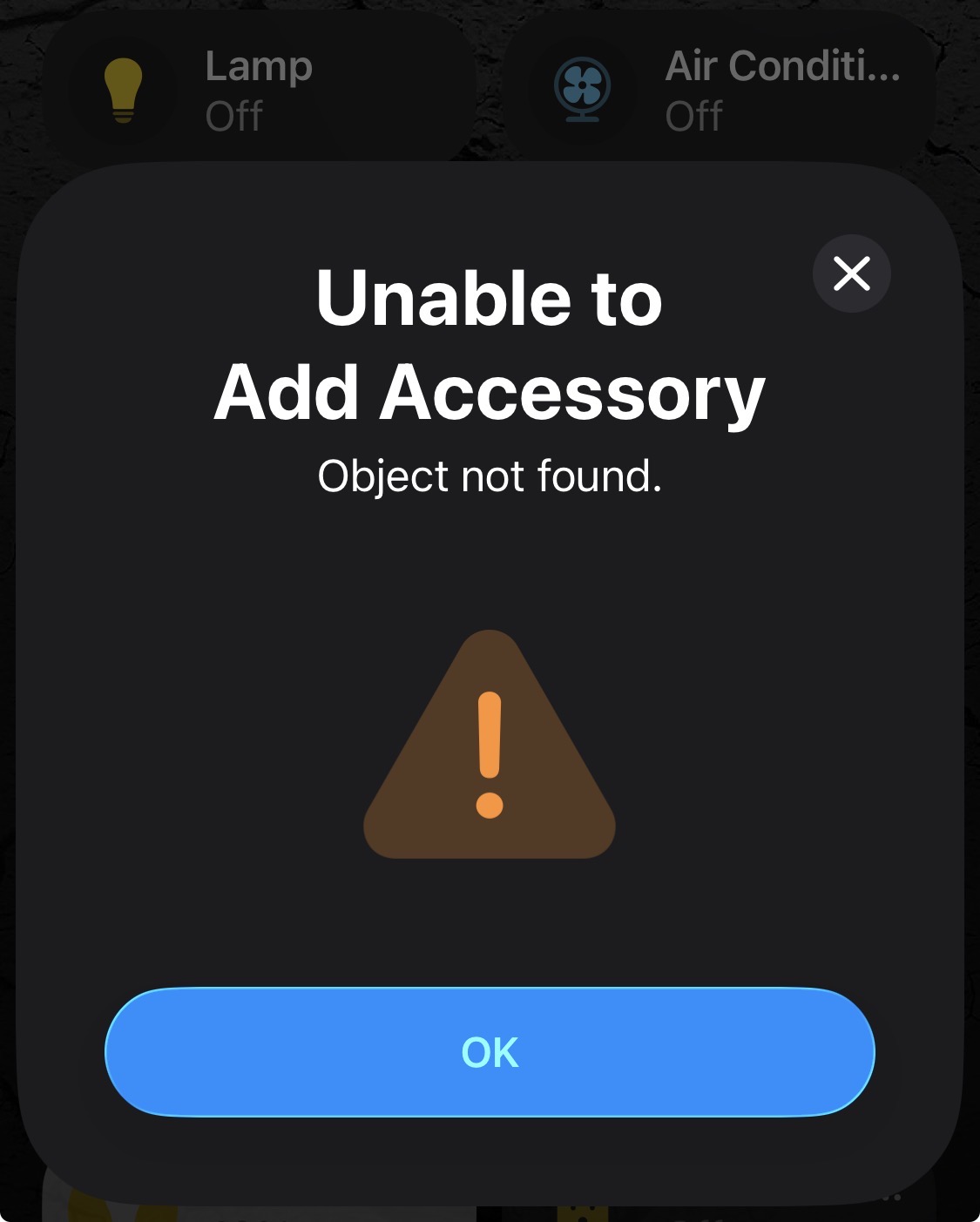
I might send one of the two back and see if the new one works.
Dear User,
The interaction logic of the Set button has not changed. To clear up any confusion, below is a detailed explanation of how the Set button works in different scenarios. Please take a moment to review it  . In addition, we will continue to improve and update our user guides, app and firmware to address the current gaps. We sincerely apologize for any inconvenience this may have caused and truly appreciate your understanding.
General Rule: How to Enter Pairing Mode
In all cases, simply press the Set button once to wake the lock.
- As long as you hear any voice prompt (regardless of what it says), the lock has already entered Pairing Mode.
- No further action is required on either the front or rear panel, even if the voice prompt seems to suggest otherwise.
Scenario 1: U400 in Factory State (Not Bound to Any Ecosystem)
When you press the Set button, the lock will announce:
“Press the Set button once and scan the setup code to add your Aqara Smart Door Lock.”
- At this point, the lock is already in Pairing Mode.
- You may now:
- Bind it to any Matter ecosystem (e.g. Apple Home), or
- Bind it to Aqara Home via Bluetooth.
 Note: Pairing Mode stays active for 10 minutes only.
We recommend pressing the Set button again before starting any binding process to ensure Pairing Mode is active.
Scenario 2: Binding to Aqara Home via Bluetooth
When you press the Set button, the lock will announce:
“To set up the lock, please verify the administrator fingerprint or password.”
- This happens because you have already created an Aqara administrator fingerprint or password.
- The lock requires Aqara admin verification to:
- Enter Setup Mode, and
- Prevent unauthorized users from resetting the lock or adding credentials.
Scenario 3: Binding to Matter Ecosystems (e.g., Apple Home) Without Binding to the Aqara Home App
When you press the Set button, the lock will:
- Directly enter Setup Mode, allowing you to configure the lock settings.
Scenario 4: When the U400 is Bluetooth-connected to your phone in the Aqara Home app
- Pressing the Set button will NOT enter Setup Mode.
- Please configure all related settings directly within the Aqara Home app.