How to link the Aqara W100 thermometer with the W600 radiator thermostat? in order to use the W100 as thermometer for the W600 Thermostat !
Using a connected thermostat has an obvious advantage: it allows you to regulate the temperature of a room intelligently. This regulation can rely either on a program built directly into the thermostat, as is the case with the W600, or on an external home automation system capable of dynamically automating temperature setpoints.
A structural limitation of radiator thermostats
Radiator thermostats, including the W600, integrate their own temperature sensor. This local measurement determines whether the defined setpoint has been reached or not.
In practice, this measurement can be biased by several well-identified physical factors.
First, the sensor is installed directly on the radiator, in immediate proximity to the heat source. This configuration mechanically results in a measured temperature that is higher than the actual ambient air temperature in the room. Some manufacturers offer software compensation, but this remains an indirect correction, highly dependent on the installation context.
Second, the radiator material plays a non-negligible role. Cast iron, steel, or aluminum do not emit heat in the same way, nor with the same thermal inertia. This difference directly affects the temperature perceived by the thermostat sensor.
Third, the radiator’s location is decisive. A radiator installed under a window, against a poorly insulated wall, or exposed to drafts will experience rapid thermal variations. The integrated sensor is then subject to fluctuations that do not accurately reflect the average temperature of the room.
These three points are based on measurable and well-documented physical constraints in building thermal science. They are not manufacturer-specific, but inherent to the very nature of a thermostat mounted on a radiator.
Why use an external thermometer?
To work around these biases, using an external thermometer is a more reliable approach. Ideally placed in the center of the room—or at least away from the radiator—it measures a temperature that is more representative of the air actually occupied.
In my experience, this method provides more consistent regulation, especially in living spaces where perceived thermal comfort is a priority.
W100 + W600: a relevant combination
It is entirely possible to create automations in Aqara Home, Home Assistant, or Homey to link an external thermometer to a thermostat.
However, if you already own an Aqara W600 thermostat, pairing it with an Aqara W100 thermometer is particularly interesting: the integration is native, coherent, and does not require complex home-automation logic.
In this scenario, the W100 becomes the temperature reference, and the W600 adjusts its valve opening based on this measurement rather than on its internal sensor.
Prerequisites to be aware of
Before setting up this type of operation, several conditions must be met. These relate in particular to the Aqara hub used, the version of the Aqara Home app, and the chosen automation mode.
Prerequisites for linking a W100 thermometer to a W600 thermostat
Before any configuration, several technical conditions must be met. Without them, the automation or link will be neither reliable nor functional.
Required hardware
- One Aqara W600 radiator thermostat, properly installed on a compatible thermostatic valve.
- One Aqara W100 thermometer, paired and operational.
- A compatible Aqara hub supporting local automations and both devices (Hub M200, Hub M3).
- A stable Zigbee connection between the devices and the hub.
Attention: this is a crucial point. The “association” function between the W100 and the W600 works only in Zigbee mode. Both accessories are delivered in Thread mode, so you must change the mode. This is mandatory.
Software and configuration
-
Aqara Home app up to date (Android or iOS).
-
Firmware up to date for:
- the Aqara hub,
- the W600,
- the W100.
Both devices must be present in the same Aqara home (same logical environment).
The W600 must be configured in automatic mode, not in permanent manual mode.
Once everything is ready
Open the Aqara Home app, then go to the W100 accessory. If this is the first time you are using the W100 thermometer, an alert will prompt you to directly link the accessory to a thermostat (orange text).
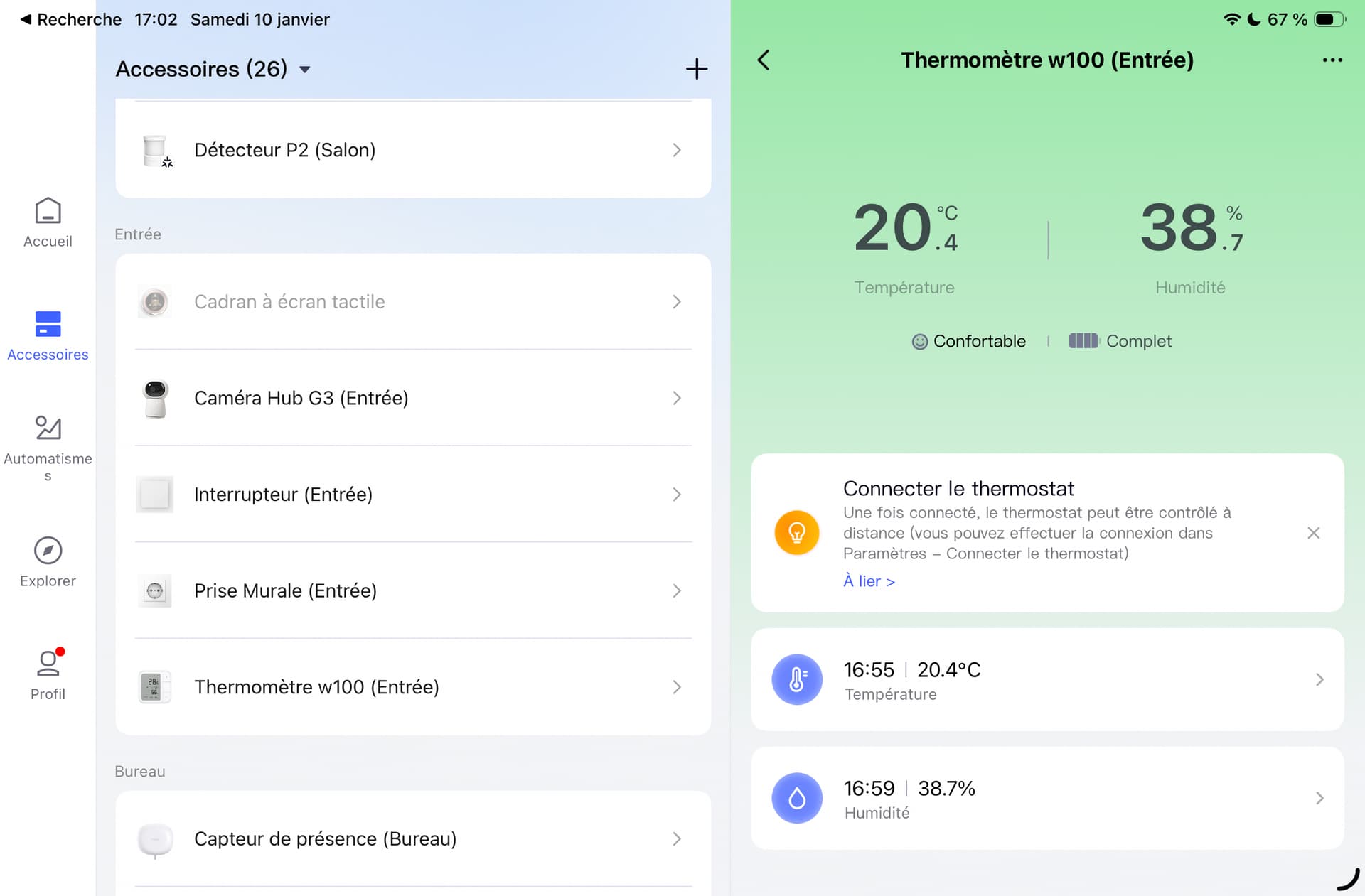
Otherwise, go to the “Connect Thermostat” section. Several devices will be available: the Hub M3 and, in my case, my two W600 thermostats.
Select the thermostat you want to associate. It is preferable that both devices are in the same room. And that’s it.
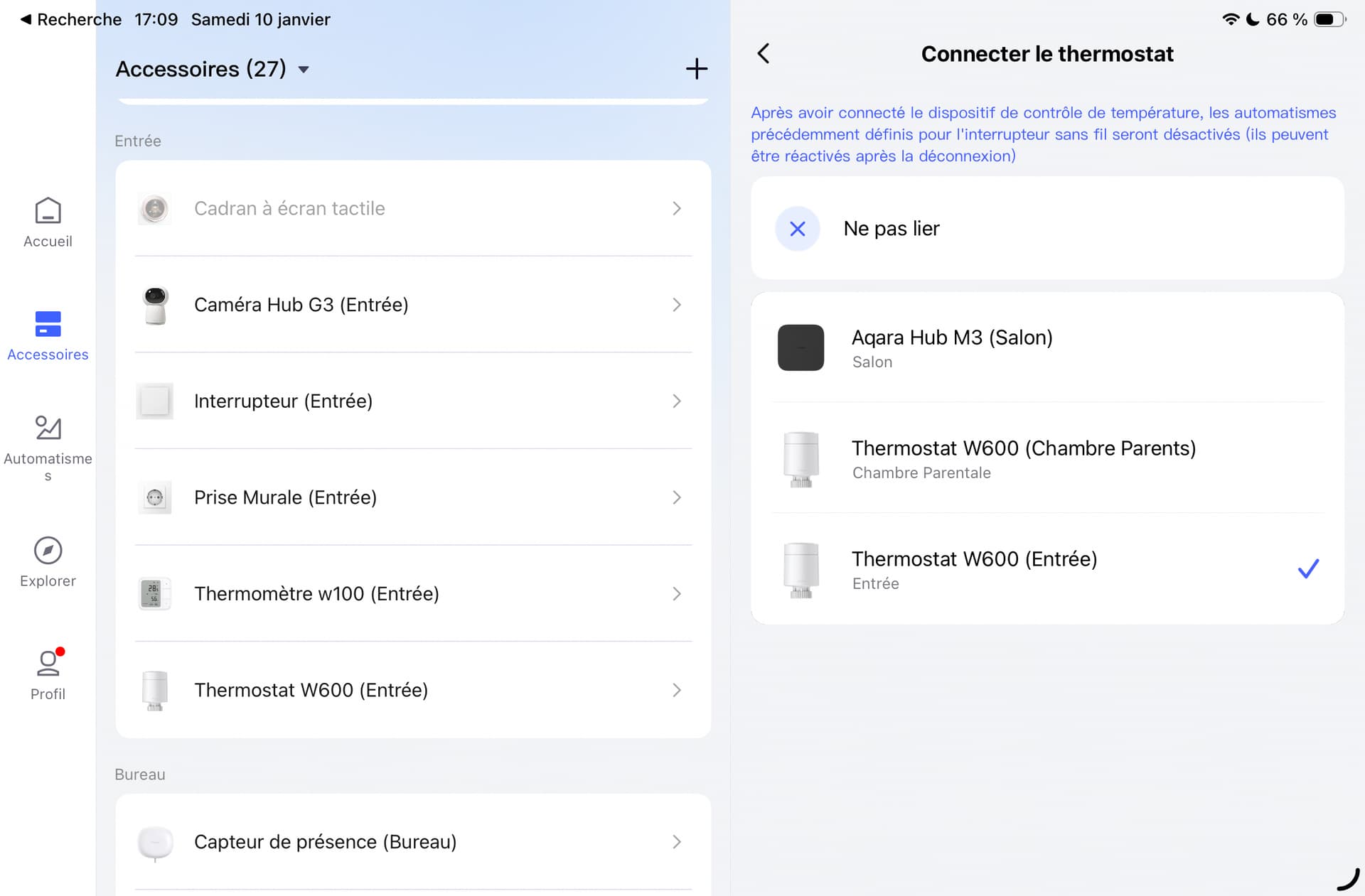
In theory, yes—but in practice, not quite. At this stage, the W100 is linked to the thermostat. However, there are a few constraints to be aware of.
By choosing this operating mode, you will lose the use of the buttons as independent controls. The buttons will only be used to adjust the thermostat settings. This is unfortunate, as it reduces part of the interest of the W100. In the center of the screen, the information from the W600 thermostat is displayed. Pressing the central button sends the target temperature to the thermostat.
In my tests, I noticed a slight latency, but overall it works well. Both devices are in the same room and Zigbee coverage is good. I believe this behavior is normal, due to the thermostat remaining in sleep mode most of the time to preserve battery life.
At this stage, however, only one problem has been solved: the W100 controls the W600, but the W600 does not yet use the thermometer’s temperature. To fix this, go again to the Aqara Home app, open the W600 settings, select “Temperature and humidity source,” then choose “Other temperature and humidity sensors.” Verify that the linked device is correctly selected.
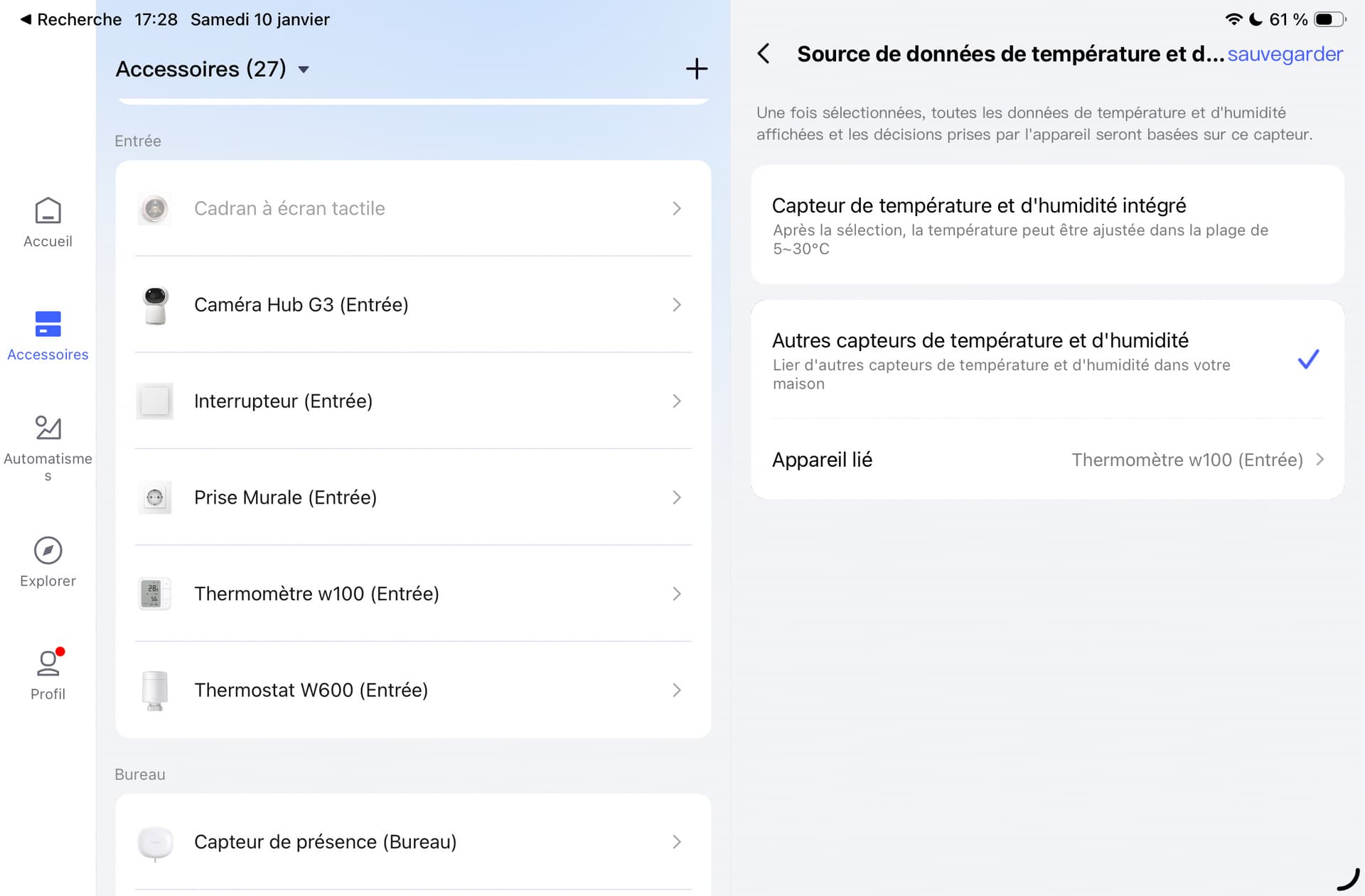
These two settings are essential for proper data exchange between the two accessories. Keep in mind that once associated, the W100 buttons no longer work independently, even in Home Assistant or Homey.
If you are in a purely Aqara environment, this solution is ideal. However, if you use accessories from multiple brands, only one option remains: creating automations to regulate the thermostat as effectively as possible using an external thermometer.
Hope this helps.