W100 to M3 via Zigbee, M3 to HA via Matter - Create button push automations?

Hi all,
Trying to see how I can create an automation based on a button press on a W100 connected to HA as above. I want to start a Sonos Roam playing BBC Radio 2. Currently I have to do this via Alexa but for some reason it always doubles up the command, therefore looking to try HA.

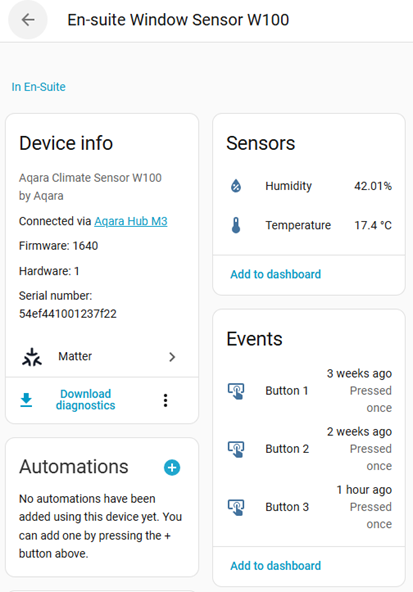
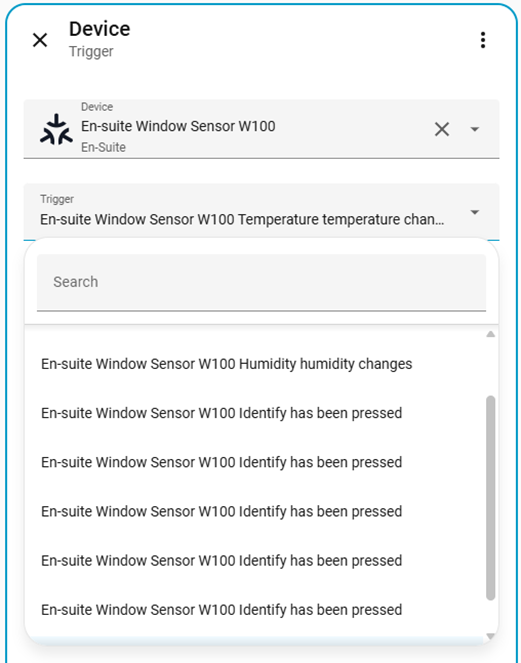
The below show the press is visible in HA (Button 3 was pressed 1 hour ago) but the Buttons don’t show up no the Automation dropdown.

What am I doing wrong / what am I missing?

Thanks

2 Likes

@2SC_UK You seem to be experiencing an issue with the W100 button not showing up in the Home Assistant Automation dropdown when trying to create a button press automation. You can contact customer support for assistance.

Contact the Aqara Home App Customer Service Team (Profile> Help & Feedback > Customer Service) or scan the QR code:


This will be more efficient. If you do not have an Aqara Home account, “Please click here” to create a ticket.

3 Likes

@Expert Anyone could help with this? Great thanks

2 Likes

Have you tried using the “Identify” actions? Maybe those triggers have wrong names in the UI, but still function as click, double click and long press (for each button).

1 Like

Hi.

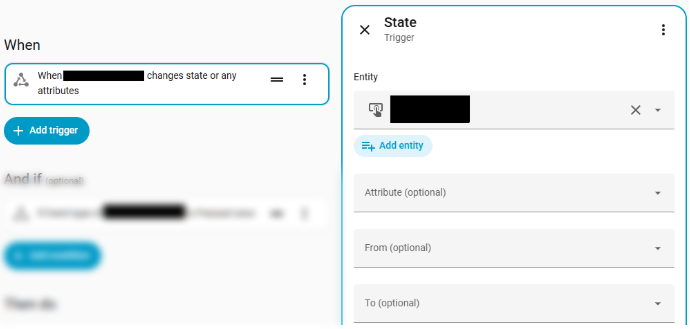
Try this in the WHEN Section: Add trigger → Entity → State
Under Entity, select Button 3.

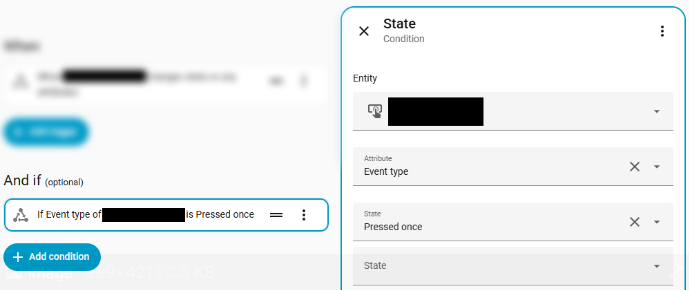
Then under the AND IF Section: Add condition → Entity → State

  • Under Entity, select Button 3
  • Under Attribute select Event type
  • Under State select Presed once

It should look like this afterward:


Also check this out—I’ve got a video of my W100 setup, along with instructions on how to set it up in Home Assistant:

3 Likes

Hi, all types of buttons behave a bit differently under Matter. Pressing a button isn’t treated as a discrete event, but rather as a change of state. @JohnD already explained this quite well.

This applies to all kinds of buttons, including the virtual ones on the Aqara S1+ panel. Here’s an example script: I’m using three virtual buttons to start the robot vacuum on demand and to switch the “parents’ area” of our house between day and night mode, which in turn triggers different scripts and scenes.

The only issue I’ve run into in the past is the occasional “ghost” event. In other words, buttons appeared to be pressed or their state changed without anyone actually touching them. And trust me, my wife was not amused when the vacuum decided to start cleaning the bedroom at 3 a.m.

alias: schlafzimmer.s1.buttons
description: “”
triggers:

  • trigger: state
    entity_id:
    • event.roby_starten
    • event.tageszeit_tag
    • event.tageszeit_nacht
      from: null
      conditions:
      actions:
  • choose:
    • conditions:
      • condition: and
        conditions:
        • condition: state
          entity_id: event.roby_starten
          state:
          • initial_press
            attribute: event_type
        • condition: state
          entity_id: input_select.tageszeit_eltern
          state:
          • Tag
            sequence:
      • action: vacuum.start
        metadata: {}
        target:
        entity_id: vacuum.ankleide_roborock
        data: {}
        enabled: false
        alias: Robby in Ankleide starten
    • conditions:
      • condition: and
        conditions:
        • condition: state
          entity_id: event.tageszeit_tag
          state:
          • initial_press
            attribute: event_type
        • condition: state
          entity_id: input_select.tageszeit_eltern
          state:
          • Nacht
            sequence:
      • action: input_select.select_option
        metadata: {}
        target:
        entity_id:
        - input_select.tageszeit_eltern
        data:
        option: Tag
        enabled: false
        alias: Tageszeit_Eltern = Tag
    • conditions:
      • condition: and
        conditions:
        • condition: state
          entity_id: event.tageszeit_nacht
          state:
          • initial_press
            attribute: event_type
        • condition: not
          conditions:
          • condition: state
            entity_id: input_select.tageszeit_eltern
            state:
            • Nacht
              alias: Tageszeit_Eltern ist nicht Nacht
              sequence:
      • action: input_select.select_option
        metadata: {}
        target:
        entity_id:
        - input_select.tageszeit_eltern
        data:
        option: Nacht
        enabled: false
        alias: Tageszeit_Eltern = Nacht
        mode: single

Check this out: Topics to remember – Bookmark and keep coming back!

Always remember: “If your car is smarter than your home… you’re driving into the future while living in the past” :red_car::house:

2 Likes

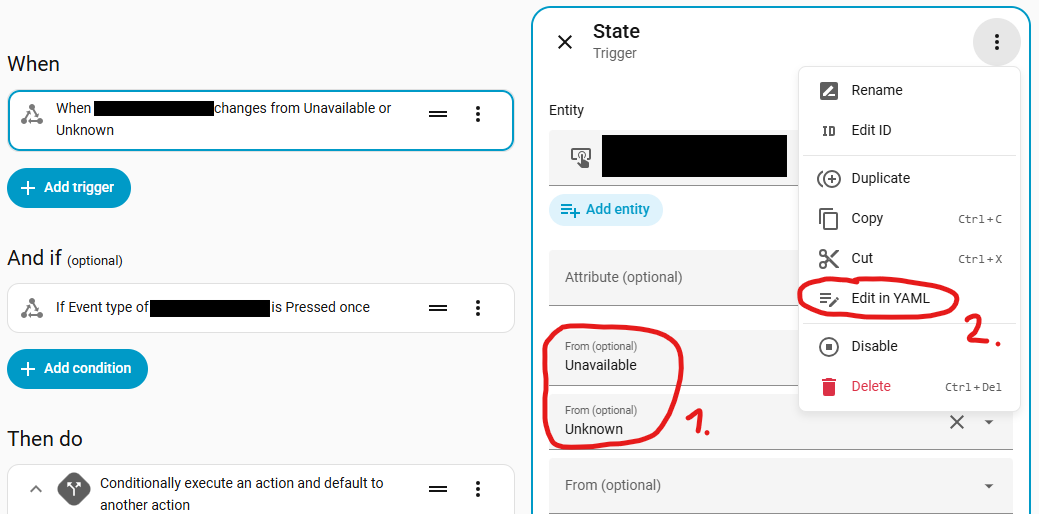
The following should help to avoid “ghost” events. But I haven’t tried it myself yet.


3 Likes

not_from is a grey area John, some times it follows some times it does not.

1 Like

Interesting, what exactly do you mean by that? not_from is officially documented, so it should technically be reliable. Are you referring to the fact that unavailable and unknown might not be enough during a system restart because the initial state is None or something else? What would be your most elegant solution?

1 Like

Thanks all.
Just back from holiday, so will review how / if I can get this working.

It’s interesting how Aqara are trying to be close to HA but Button’s don’t appear as simple authorisations.

Thanks

1 Like

As far as I know, this applies to all Matter devices in Home Assistant, including those from other manufacturers.

1 Like

when you add not from you are adding another point of fail in the trigger, when restarting, and cause the automation not to work (small but minor point) so when I use not from I also use condition uptime sensor. its not major but I do find issues when restarting with not from.