I’ve created a small smart home setup for my girlfriend’s apartment. The central is Aqara M100 with some sensors and Alexa (Echo Pop). The problem is with pairing third-party matter devices. First, I’ve tried to pair some generic matter WiFi switch from AliExpress with M100. It failed, but I was able to pair it via matter with Alexa - it worked (so I assume the device is ok and the network setup is also ok - ipv6 etc). Then I’ve tried the same with the new IKEA bulb KAJPLATS. Same situation, it failed with M100, with Alexa it asked me for thread credentials (echo pop is matter controller, but without thread). But as far as I know, I can’t export those credentials from M100 so I gave up.
Later that day I took this bulb to my apartment and was able to pair it via matter with no issue with my M3 hub.
I’m wondering what might be wrong with the M100 failing to pair any third-party matter device (regardless it’s wifi or thread). It always fails at “registering device” step - the process never ends.
it won’t work with android app, it’s bugged somehow. You can pair them with iOS app only.
Such a scenario is definitely problematic, as the Thread credentials are stored on the smartphone when the Thread network is created (in the encrypted iCloud Keychain on iOS / in Google Play Services on Android). At least if we assume Thread version 1.3. This will change in the future with Thread 1.4 and Matter 1.4.
But let’s assume that you created your Thread network with your smartphone and can therefore add devices to it. The first question that arises is which smartphone/account was used to create the Thread network at your girlfriend’s house. Since the Thread credentials are requested during pairing, I would assume that the network was not created with your smartphone/account. Or the Thread Border Router has been reset in the meantime.
To rule out such problems, I would suggest that you use your smartphone for your smart home in your apartment and, conversely, your girlfriend’s smartphone in her smart home.
Since it works for you, I would recommend that you don’t change anything in your own home. At your girlfriend’s home, you might want to consider performing a factory reset of the hub (border router) and then recreating the Thread network (important), so that the Hub generates fresh credentials and passes them to the smartphone as the new default.
As far as IKEA devices and Android are concerned, there seem to be other problems. But maybe try the following trick:
But as Sugar already wrote, it probably won’t work with the M100, and you’ll have to do something different with the light bulbs, of course. But I would give it a try.
Just because Matter works over Wi-Fi does not automatically mean that Matter also works over Thread. With IPv6 in particular, your devices may have created their own link-local addresses. However, packets with these addresses are discarded on their way to the Thread network, whereas this does not happen in the Wi-Fi network. Be sure to check which addresses are used by the devices in your network. For more information, see the chapter “Link-Local vs. GUA vs. ULA” in the tutorial: Matter & Thread: A Guide Through the Jungle
The problem seems to exist among all thread devices - I’ve just tried to pair Aqara W600 thermostat using thread and it hangs on “registering device” same as IKEA bulb. After switching to ZigBee I was able to pair this thermostat with M100.

Zigbee works completely differently. If you get stuck in the last step when connecting via Thread, there is most likely a problem with the feedback from the Matter device in your network. Check whether IPv6 and mDNS are working correctly. Temporarily disable the 5 GHz WiFi.
Ok, I’ve checked with different router (Unifi Express), different phone OS (iOS and Android), recreated the thread network in M100 multiple times - it doesn’t work 
I was able to connect the same device to my M3 and G5 camera with no issue. So the problem must be with M100. It can’t connect any Thread device, regardless if it’s Aqara or different brand. Also deleting thread networks does not work, they re-apear in the settings menu.
I see that the M3 and G5 support 5 GHz Wi-Fi, but the M100 only supports 2.4 GHz. If your smartphone is connected to the 5 GHz network too, that could explain why you’re experiencing this issue. Have you temporarily disabled the 5 GHz Wi-Fi?
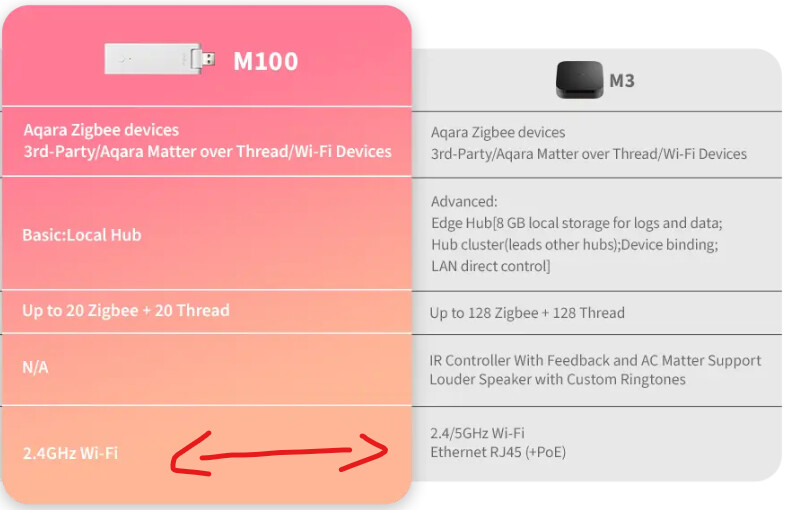
I’ve been connected to 2.4 GHz, I have separate SSID for IoT devices.
I can only strongly recommend trying it again with the 5 GHz network disabled. It’s not just about the smartphone, but also about the mDNS traffic during pairing, which is usually sent via the primary Thread Border Router.
It is not possible to manually designate which device acts as the primary Thread Border Router. So, if any of the Thread Border Routers are still connected to the 5 GHz network, you will likely run into the same error again. Furthermore, settings like “Band Steering” might be forcing a device into the 5 GHz band.
You can re-enable the 5 GHz network once pairing is complete.
I can try this, but M100 is the only thread border router I have in this setup. Also if I’m not mistaken, band steering works when both SSIDs are the same for 2,4 and 5Hhz.
The last think I can try I hard reset the M100 hub, but. I have already set up a few ZigBee device and some automations, connected it to Alexa, it will take some time to re-do it, so that the last resort
Okay, let me ask again: Was the Thread network on the M100 created with your smartphone or another device? Did you then create another Thread network with your smartphone?
Edit: Sorry, please disregard my last questions. You actually already answered it indirectly when you mentioned that you were able to connect the same device at your own home using your M3 and G5 hubs.
This implies that your smartphone has passed your specific Thread credentials to the device. So, it is safe to assume that when you try this at your girlfriend’s place, your phone is again trying to pass the credentials for your home Thread network to the Matter device. The device then tries to join your network but obviously can’t find it there.
My recommendation: Factory reset the M100 and set up your friend’s Thread network using a different smartphone (ideally hers). This prevents your phone from passing the wrong credentials and ensures you don’t overwrite your own settings and accidentally “lock yourself out” of your own Thread network.