The binding process of the U400 to the M100 has been a very frustrating experience so far.
It did work flawlessly with between the U100 and the M100 though.
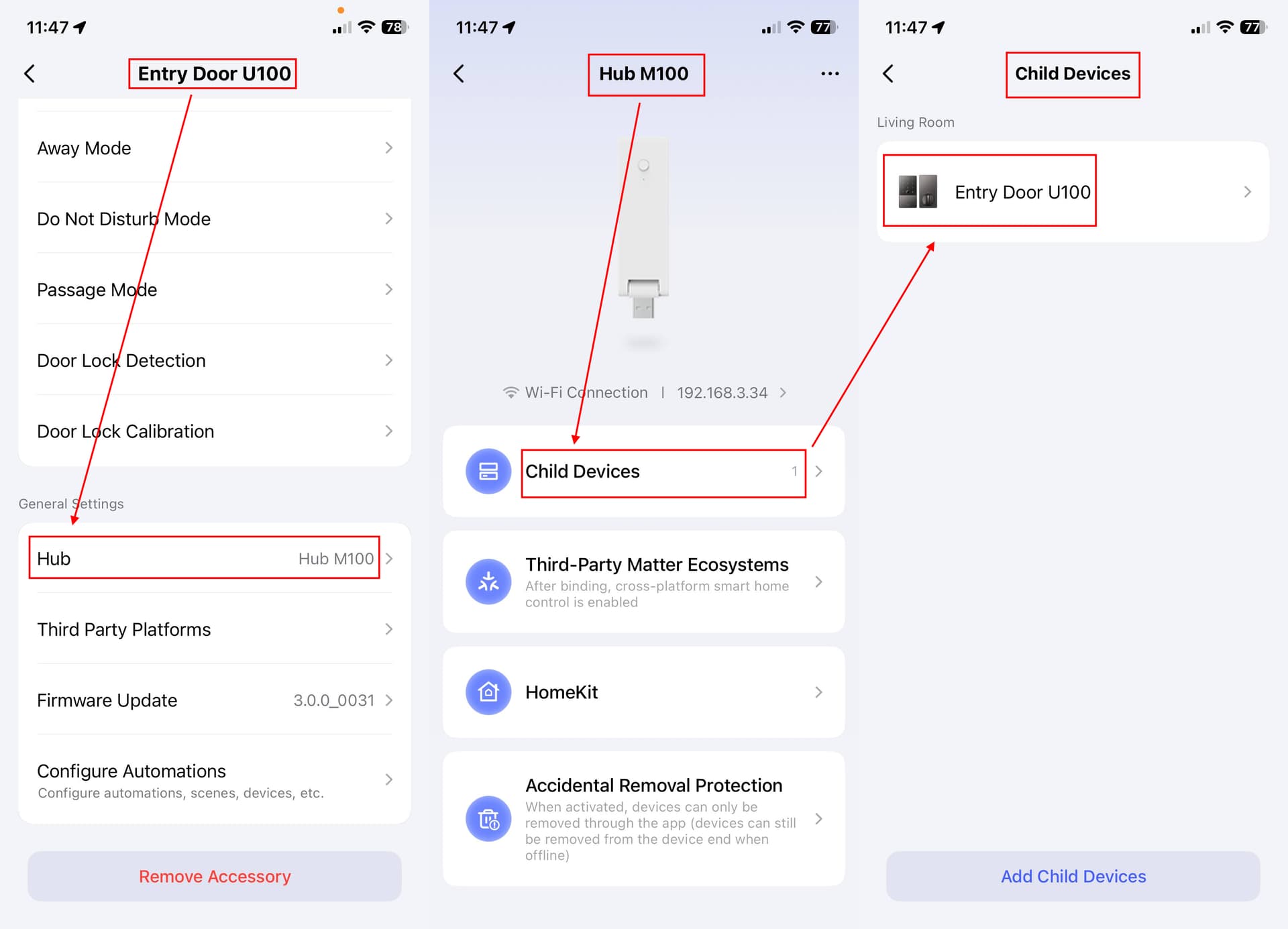
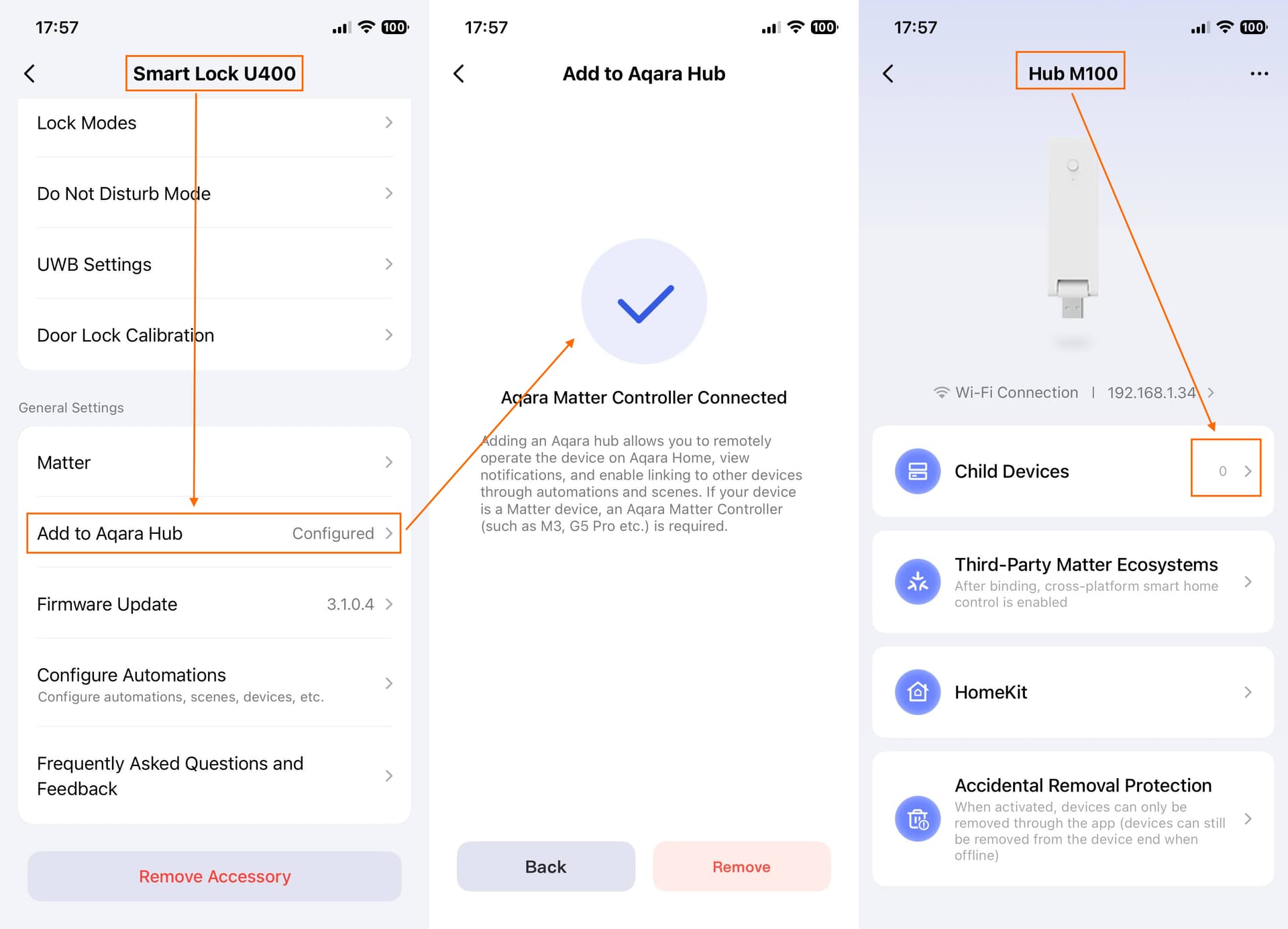
When going through the process of setting up the U100, you pair it with the Aquara App, then bind it to the M100 hub. As a result, the U100 displays as a child device of the M100 as seen below:
With the U400, it is a totally different experience.
First of all, I have to set it up with Apple HomeKit first (my experience is that it was failing with the Aquara App first).
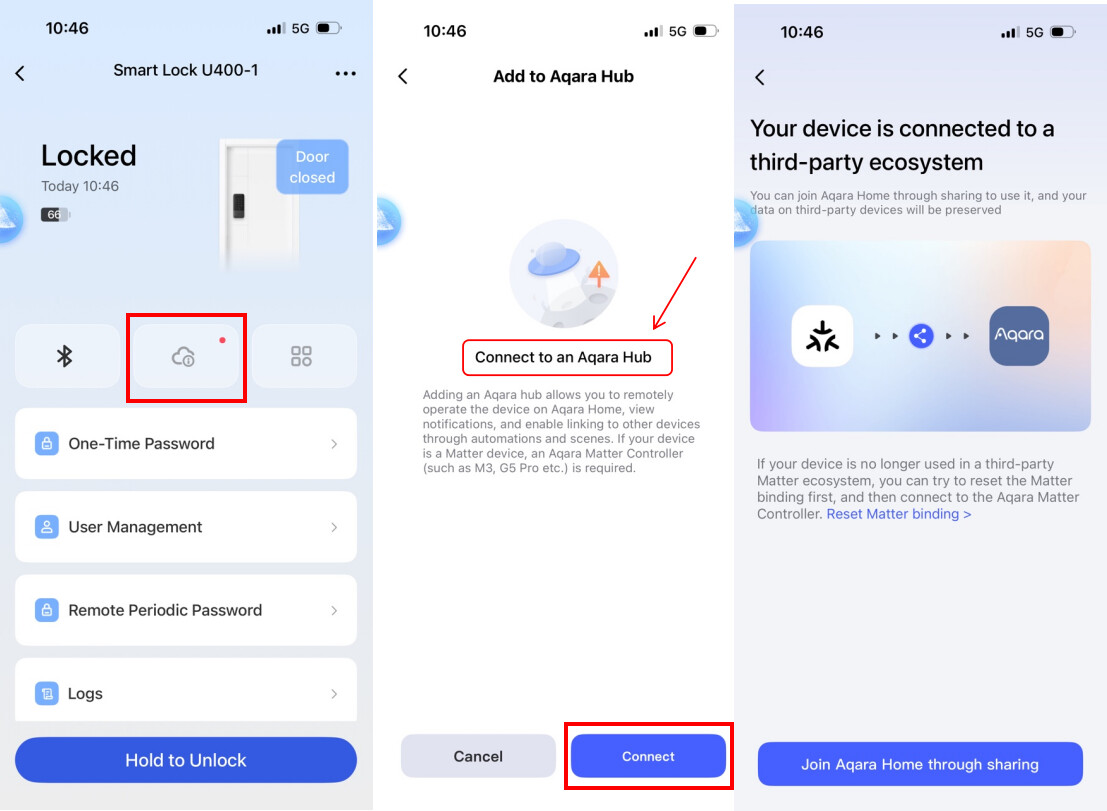
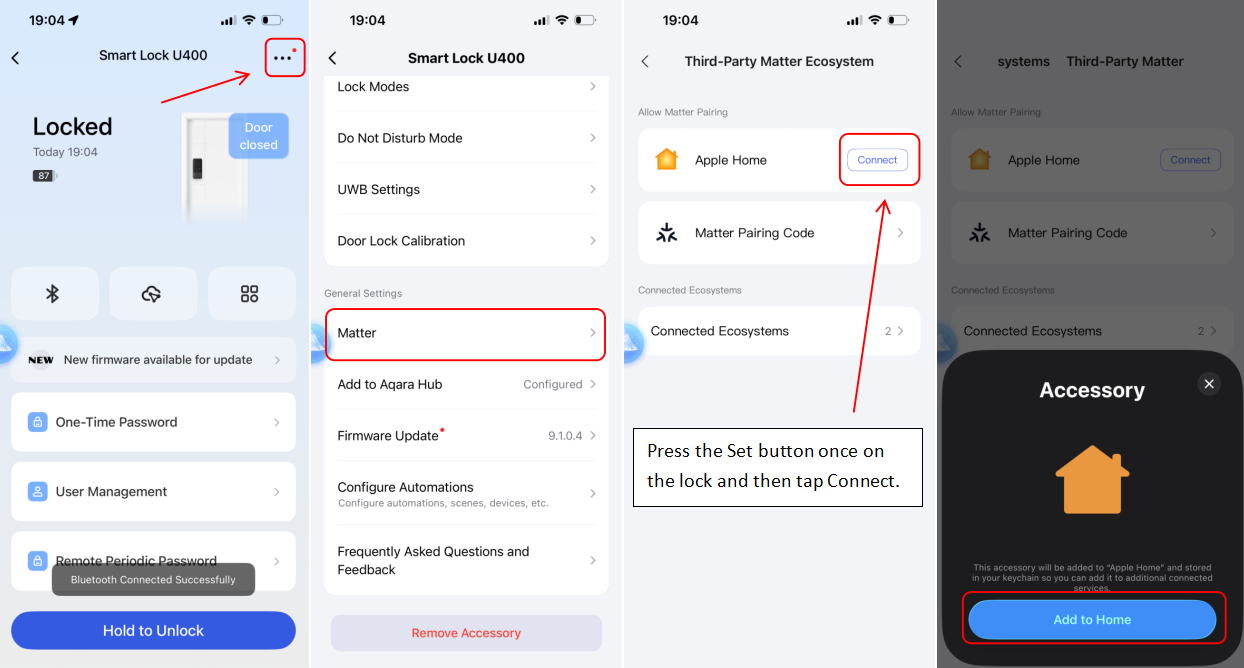
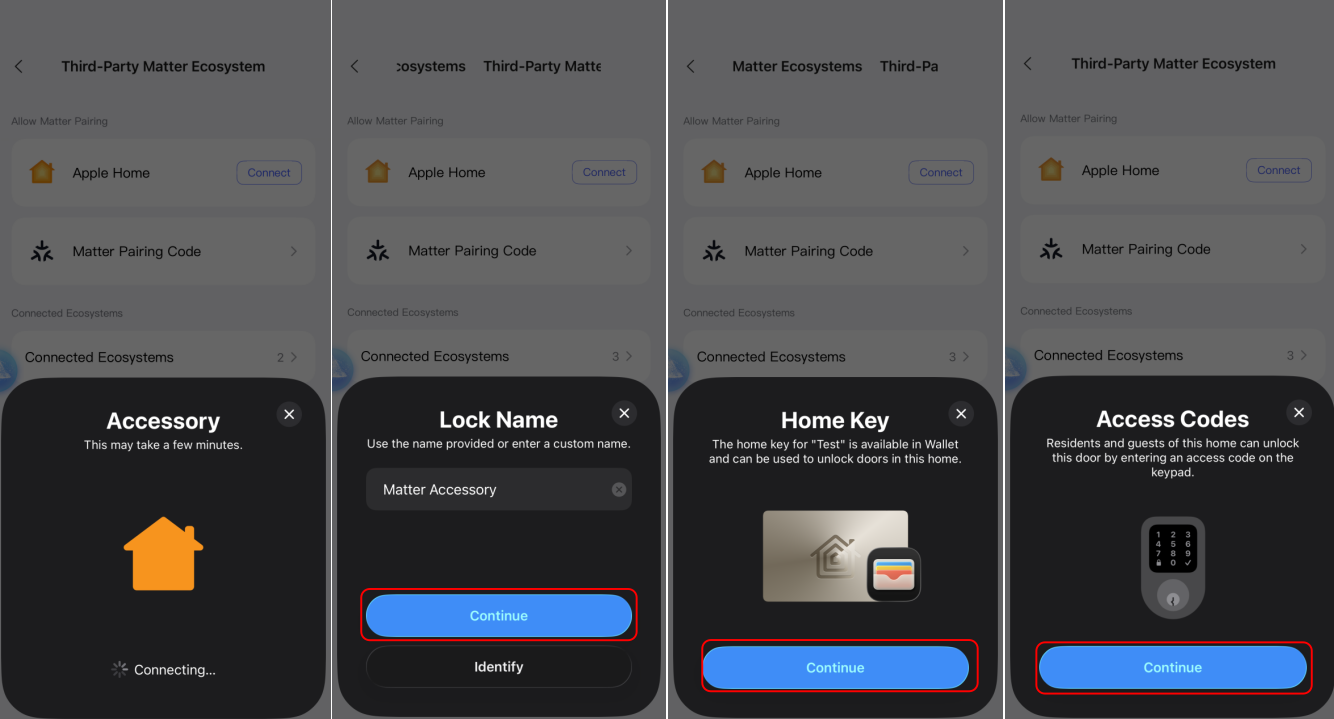
Then, I try to bind the U400 to the M100 as seen above. But it doesn’t work. Instead, I am being asking to bind the U400 to a third-party Matter ecosystem, like shown below. Not only it fails every time I test, but it doesn’t use the M100 Hub which defeats the purpose of having the hub … (Am I correct here?)
Do I even need a M100?
Also, My AppleTV (as a HomeKit hub) is physically really far from the U400. So I’m really confused about how all that works. Does my phone connect to my wifi which in turn gives it access to my AppleTV (as a HomeKit hub)?
Dear users, we sincerely apologize for the inconvenience caused when binding an Aqara hub (such as the Hub M100) to the Aqara Home app. We understand that the current UI can be misleading, and we’re committed to improving the experience in upcoming updates.
Alternative Setup: Binding via Aqara Hub First
If your Apple Home Hub (like an Apple TV) is located far from your door, but you have an Aqara Hub (e.g., Hub M100) positioned close to the lock, we recommend this setup flow.
Assumed Hardware Configuration:
Apple Hub: Apple TV 4K (2nd Gen)/(3rd Gen, 128GB) located far from the door.
Aqara Hub: Hub M100 (located within 3m of the lock).
Phone: iPhone 11 or later (running iOS 18.5+).
The 3-Step Setup Process
1. Initialize & Reset
Start with the lock in its factory default state.
To Reset: Press and hold the Reset button for 5 seconds. (You may need to verify the Admin fingerprint or password to complete the reset).
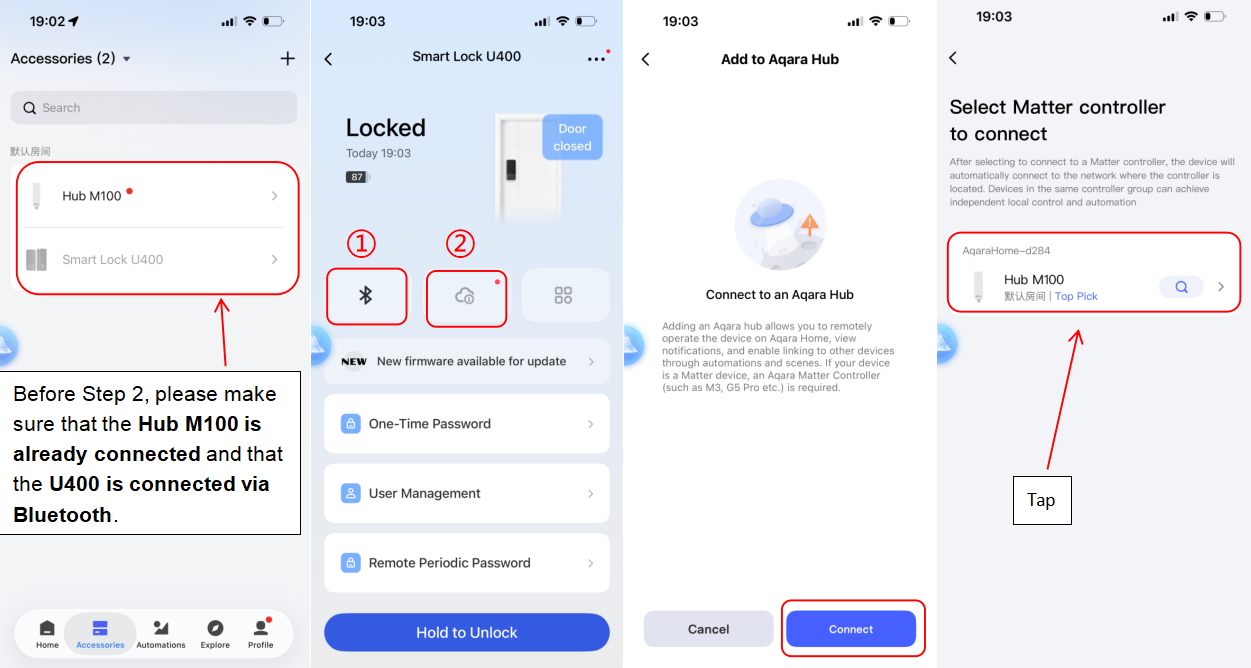
3. Step 2: Connect to the Aqara Hub (Matter Integration)
This step connects your lock to the Aqara Hub via Thread for remote access.
Check First: Ensure your phone is on the same Wi-Fi as the Hub, Bluetooth is ON, and IPv6 is enabled on your router.
In the Aqara Home app: Open the U400 page and tap the Cloud icon.
Connect: Select “Connect” and choose your Hub M100 (or M3)
Follow the prompts to finish the Thread connection.
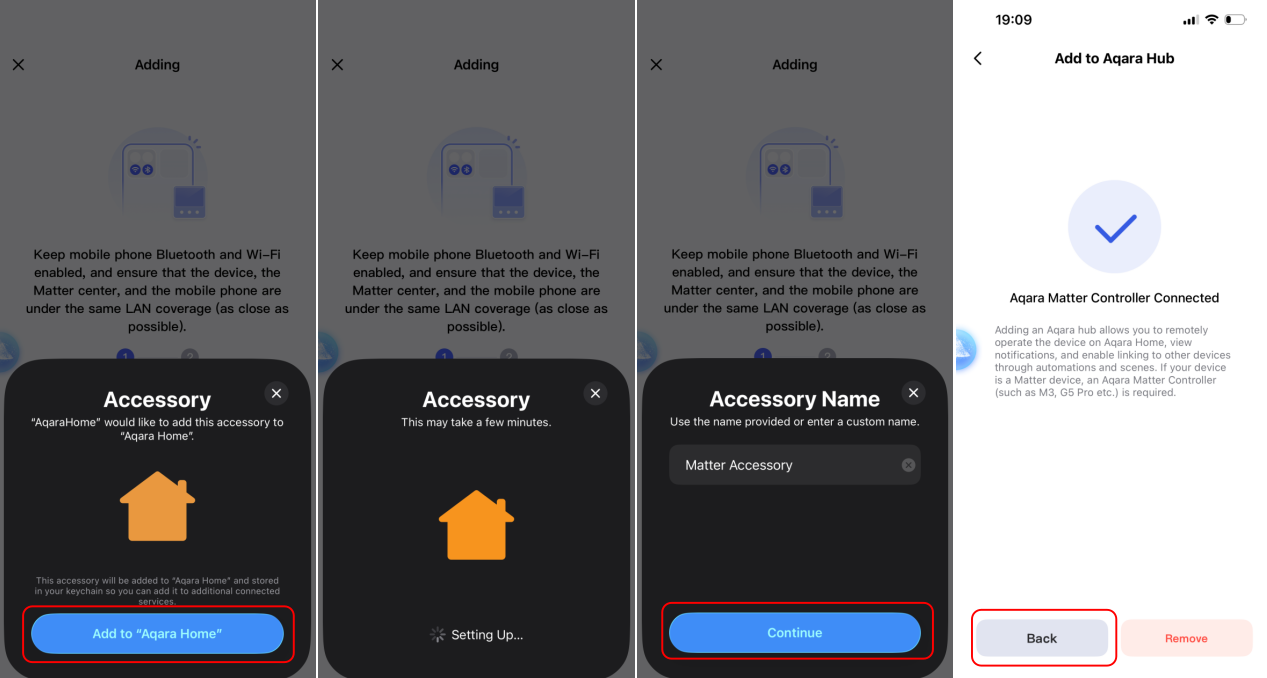
4. Step 3: Share to Apple Home
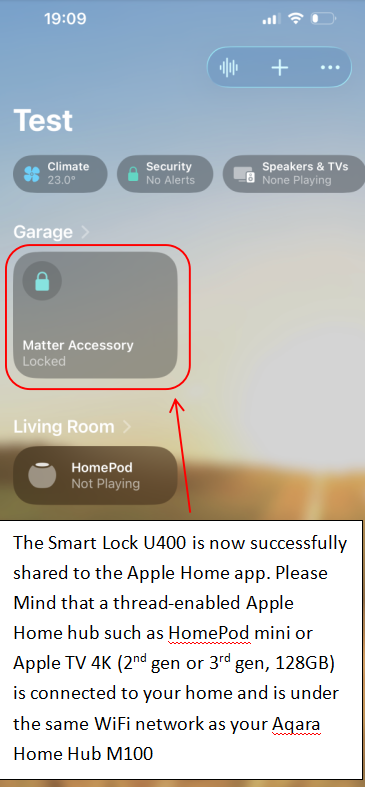
Now that the lock is on your Aqara Thread network, you can share it with Apple Home for UWB and home key features.
On the U400 main page, wait a moment for the Bluetooth connection to stabilize.
Go to Settings > Matter.
Press the Set button once on the physical lock, then tap “Connect” in the app to share the lock to Apple Home.
Follow the prompts and finish the binding.
Key message for this Connection method
If you choose to use the Hub M100 as your primary Thread Border Router, please keep these two points in mind to ensure a stable experience:
Network Unity: Your Apple TV and your Aqara Hub M100 must be connected to the same Wi-Fi network. This ensures the remote access to the lock in the Apple Home app
The Role of the M100: In this specific setup, the Hub M100 acts as the “bridge” (Thread Border Router) for your U400.
If the M100 is unplugged, moved, or goes offline, the U400 will become “Unresponsive” in the Apple Home app.
You will lose the ability to control the lock remotely via Thread until the M100 is back online.
Thank you, I will try your step by step method. This is very instructive.
Your “key message” is also right on point, this is exactly what I am looking to achieve (have the M100 close to the lock because the AppleTV is far away.
By the way, is the M100 range really 10 meters? That seems really short, do you have a model with longer range?
How necessary is it to have IPv6 enabled?
My internet provider doesn’t provide any IPv6 connectivity.
Note that my U100 does bind to the M100 in the same configuration (no IPv6)
I did follow your instructions, and it worked. Although the HomeKit integration was slow and failed at the step of adding the personal code. I had to go in Apple Home and manually add a personal code individually.
Now, I am really confused about the binding status of the U400 to the M100.
In my previous post, the M100 shows that there is a U100 bind to it as a child device.
However, the U400 doesn’t show up as a child of the M100 in the same way.
Thank you for your feedback. We’ll test the M100 hub connection internally to better understand what might be causing this issue. In the meantime, could you please let us know whether you’re able to control the U400 remotely in both the Aqara Home app and the Apple Home app?
In addition, to address your earlier question:
We recommend placing the Hub M100 within about 3 meters of the door lock to ensure a stable connection.
For a more robust and reliable Thread network, we also recommend using Hub M3 or Camera Hub G410.
A distance of 10 meters can be challenging for Thread connectivity. In general, we suggest keeping the hub within:
Up to 5 meters in an open space
Up to 3 meters if there are obstacles such as walls or corners in between
Matter is an IP-based smart home protocol that was designed from the ground up to run over IPv6 networking rather than IPv4. Without IPv6 enabled on your local network, while your devices might seem to pair successfully at first without it, they will eventually stop responding or lose functionality. To ensure a stable connection, please make sure IPv6 is enabled on your router.
Yes, I am now able to properly control the lock remotely using both the Aquara App and Apple Home app.
I was able to configure my router to use IPv6 on the local network (even though my Internet Service Provider doesn’t not support IPv6)
After this new re-install, and re-calibration, the auto-lock feature seems more reliable and does not trigger when leaving the door slightly ajar.
Now that I have 2 Aquara locks, the main challenge is user management. Having to set up users on each lock (as well as codes and fingerprints) individually is painful. We have a 3rd door and I’m not sure I want to put a smart lock on it now.
We need an option to create users then assign them to each lock.
Finally, it would be really appreciated if the app UI could be consolidated / simplified / cleaned up.
For instance, in the lock, “Remote Periodic Password” leads you to create a user. It should be in “User Management”. Which then triggers the question: from the end user stands point, is there any reason to even have a “Remote Periodic Password” and a “Scheduled User”?
Other example, in the logs, it says “Unlocked with Matter”. Since there are users created, the log should be able to let us know who locked/unlocked.
On the M100 menus, There are 3 menus “Third Party Matter Ecosystems”, “Add to Aquara Hub”, “HomeKit”. It could benefit from a consolidation. (by the way, is there a difference between Apple home in the “Third Party Matter Ecosystems” and Apple HomeKit in “HomeKit”?)
The “Child Devices” menu is both on the M100 main screen and on the “…” sub-menu. Again, simplify.
Anyway, thank you for your support and great products!
Thank you for your detailed feedback. We have addressed your specific questions below to help clarify how the U400 integrates with the M100.
1. Why doesn’t the U400 show in the M100 “Child Devices” list?
Currently, the Hub M100’s Child Devices menu only displays Zigbee devices (like the U100). Because the U400 is a Matter-over-Thread device, it operates under a different protocol.
Note: Our team has received this feedback and is working on updating the UI to improve how Matter sub-devices are displayed in future app iterations.
2. User Management & Multi-Lock Migration
The Aqara Home app does not currently support migrating user data between multiple locks. However, for a more seamless experience across multiple doors, we recommend adding your locks to the Apple Home app.
The Benefit: By using Apple Home, your UWB keys, Apple Home Key, and user codes are managed centrally. You won’t have to set up every family member from scratch for each new lock.
3. Scheduled User vs. Remote Periodic Password
It is important to distinguish between these two features:
Scheduled User (Local/Bluetooth): This is a local management feature in the Aqara Home app. It supports 6–10 digit codes and specific time/date scheduling. It must be managed while your phone is connected to the lock via Bluetooth.
Remote Periodic Password (Matter-based): This allows for remote management via a hub. It supports 4–8 digit codes. To use this, the U400 must be connected to a compatible Aqara Hub (like the M100/M3).
4. Activity Logs & User Names
Currently, the Aqara Home app log does not display specific user names for every unlock event. We are actively working on implementing this feature.
Pro-Tip: If you share access with family members via the Apple Home app, you can view more detailed “Lock/Unlock” notifications and logs directly through Apple’s interface.
5. Binding: Matter vs. HomeKit
When setting up the U400 with the M100, you should use the “Third Party Matter Ecosystems” option in the Aqara app for multi-platform binding. You can ignore the traditional “HomeKit” setup button for this specific configuration.
Thanks again for the suggestion, really appreciate!