I had to switch back to the E1 for the same reasons. The biggest issue is that the device doesn’t stop heating even after the room temperature exceeds the threshold. Hopefully, a firmware update will fix these core functions, as the W600 is currently not reliable in this state.
2 Likes
Can anybody who received the W600 comment on the housing (plastic body) of the valve? I once bought six E1 and am/was quite happy with their overall performance … but one E1 is now inoperable because the plastic of the body became brittle over time and the valve connector plastics (underneath the sleeve nut) broke off. I can no longer connect it to the radiator. Another two E1 units now show a similar issue on the other end: The front facing display is held by three screws, but the plastic screw holes now have deteriorated and became brittle, too, This causes the rotating ring to get stuck or even worse you can no longer change the batteries … Seems like the plastic can not withstand the heat it is exposed to by the radiators - at least not the 2.5 years I now own them. I wouldn’t consider to buy new E1 or W600 until Aquara states they’ve addressed this plastic issue …
1 Like
After updating to version 1335, I haven’t seen any issues except for the inability to group items. It’s been running fine for 48 hours now.
So i got my w600.
First impressions:
- Much more pleasant interface in the app.
- Overall it feel more solid than E1 thermostat
- On the unit it shows 23.5 degrees all the time after i turn on the screen. But in reality i have set to less. @AqaraOfficial
- Its very quiet. Like very
1 Like
During testing there is no stupid question or stupid answers… So I’m asking if you noted that first click shows room temperature and second one sets temperature. Maybe you have stable 23 degrees in the room. I use this device almost a week and after first day problems with older firmware, now it works. Reacts very quickly on opened window (temperature), reacts immediately on opening window and turns off as a part of automation (if window is off turn valve off), when i close window reacts in second on automation and turns on again. I also didn’t note if time to cooling down radiator is longer than using my fibaro valve. We will see how another week will pass and what outcome we see.
2 Likes
Thanks for the response.
No, the temperature was around 22. When i press the button (twice i guess) it shows my previously set 22. But the first press is still 23.5
1 Like
I have an issue with temperature.
I’ve set the temperature of 22 the whole day. The room is 23 and the radiator is on.
I have paired with temperature sensor T1 and it shows 23, so the thermostat is not turning off as it should.
1 Like
In my opinion, the first one displays the temperature and maintains it. The FAQ says that if the temperature is set to 22⁰, when it reaches 23⁰, it closes the valve to maintain it; when it drops to 21⁰, it opens the valve further. So, it works perfectly. If it didn’t close, the temperature would be significantly higher. If you want to check whether it’s closing, set the temperature to 15⁰ and check the radiator by touch after three to four hours. Its main function is to maintain the temperature.
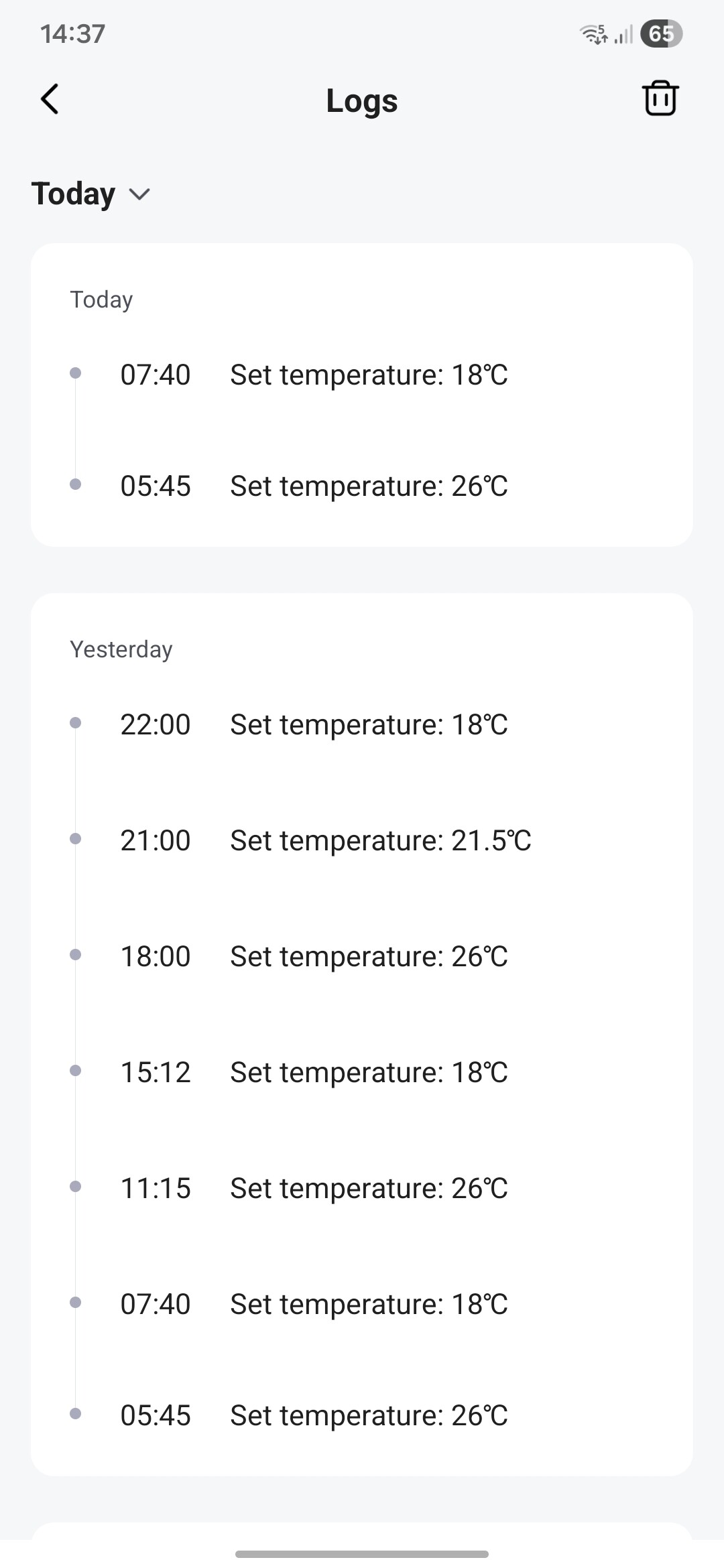
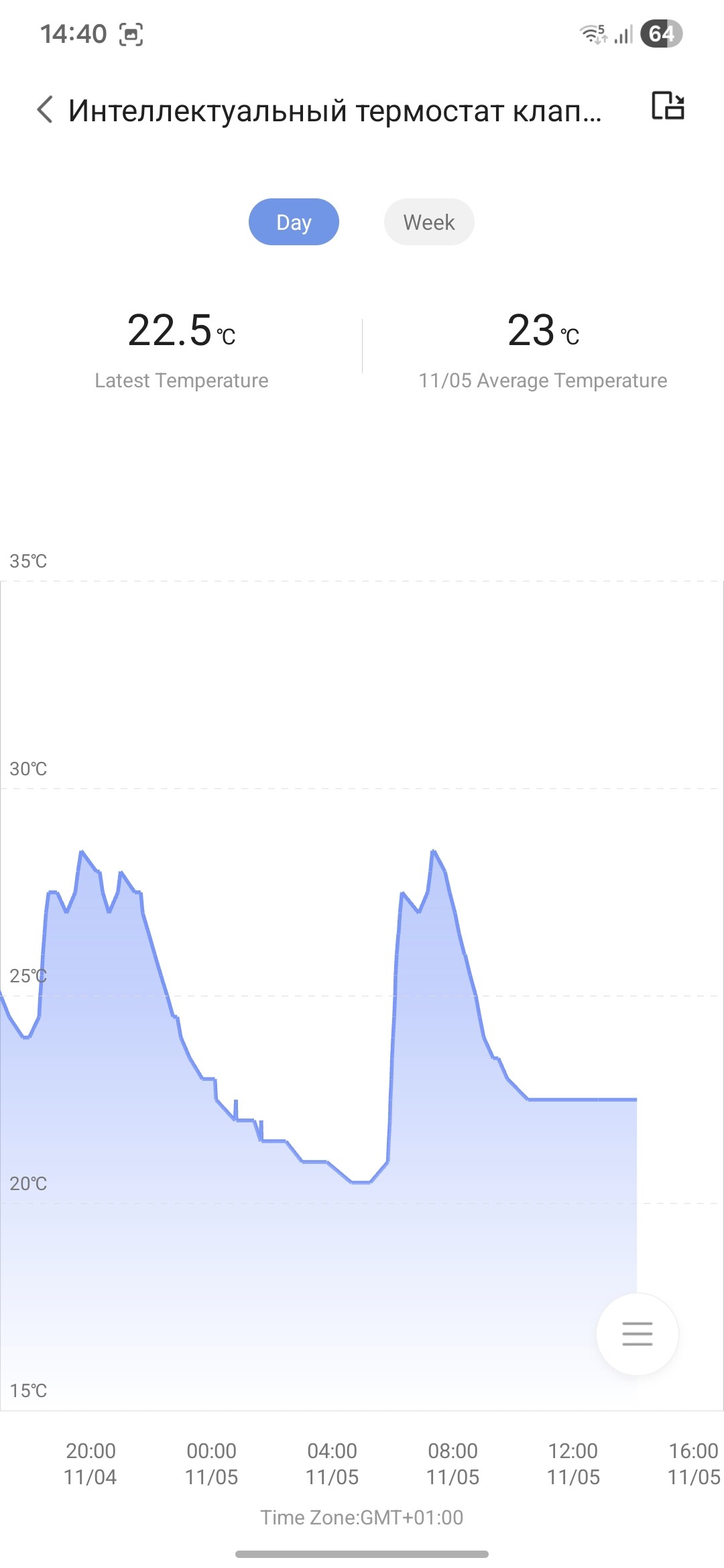
I just realized I found another issue - or maybe it’s a feature. Last night the temperature dropped to the “Sleep” scene setpoint, and after the system automatically switched to the “Day” scene the valve started operating. Earlier, when the temperature did not reach the “Sleep” setpoint, the valve remained closed even though the temperature was 1.5°C below the “Day” setpoint. I’m testing this valve in a south-facing room since, so it was capable of maintaining the temperature during the recent relatively warm and sunny days.
It seems the next scene won’t activate until the previous scene’s target temperature is reached. That’s odd IMHO scenes shouldn’t affect each other like that.
1 Like
What does history show?
Smart scenarios work based on time, not temperature.
Thanks for the clarification, but that behavior still looks wrong. If smart scenarios are purely time-based, they should not depend on whether the previous scene reached its temperature target. Right now the system behaves like this: Sleep = 18°C, Day = 20°C. If the temperature doesn’t fall to 18°C during Sleep, then when Day starts the valve stays closed (temperature remains below 20°C). If Sleep does reach 18°C, the valve opens after switching to Day and heats toward 20°C. That explains reports of valves not closing and temperature drifting upward, but it also means scenes are interdependent in a way that breaks expected operation. Can you confirm whether this is intended behavior or a firmware bug? If intended, it should be documented; if not, please escalate to development.
2 Likes
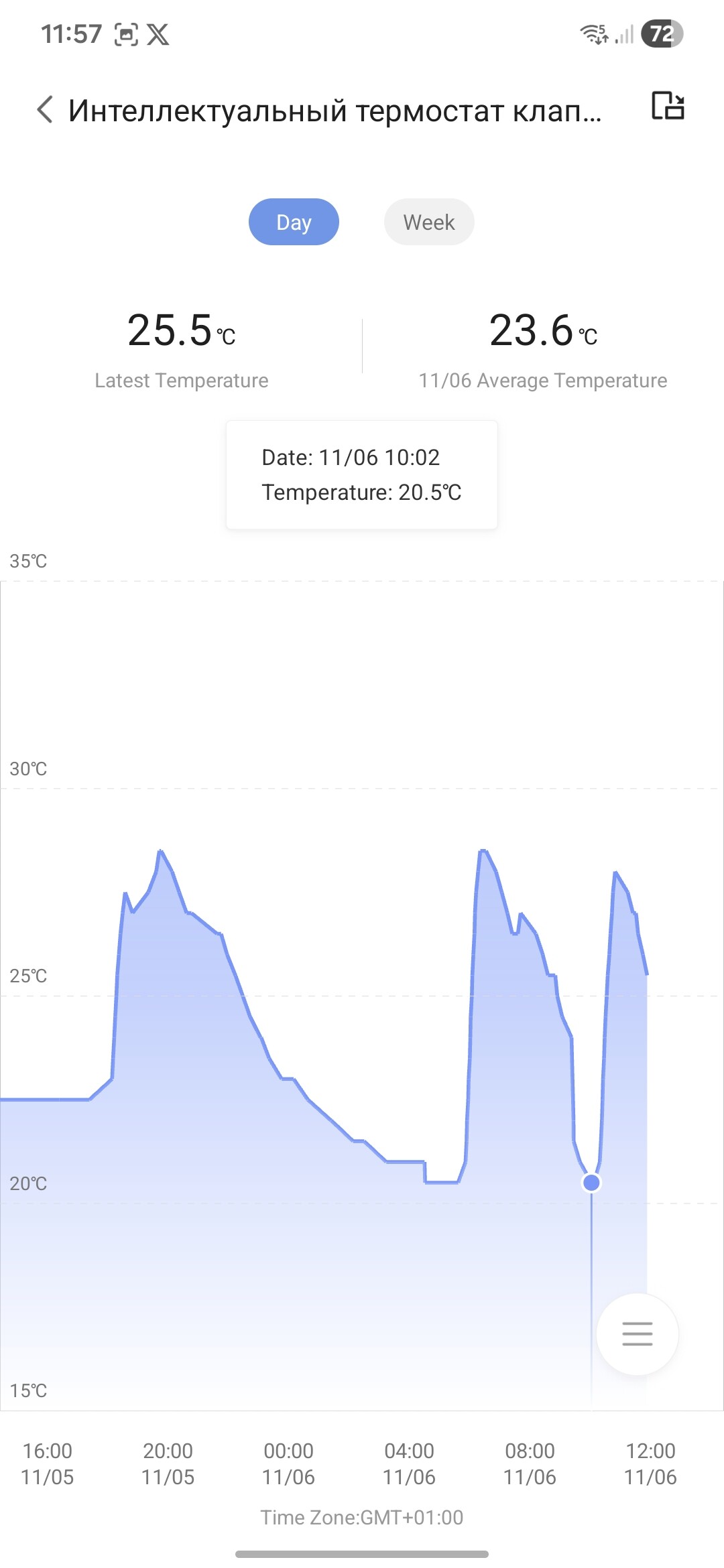
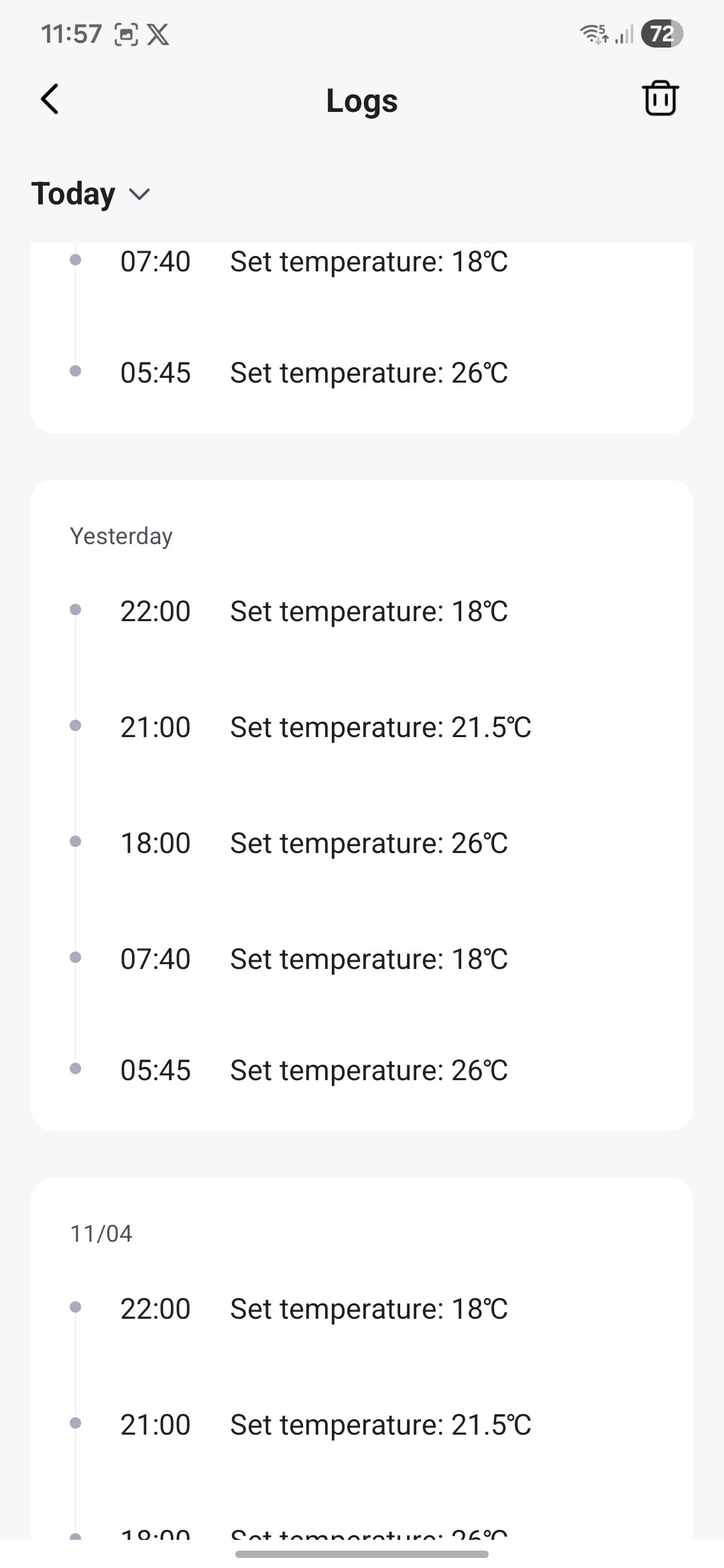
As you can see from the graph and history, I’m set to 18 degrees at night, but since it’s still warm outside, the temperature doesn’t reach 18 degrees and stays at 20.5 degrees. The logs show changes, which are consistent with both manual checks in the app and on the device itself. Try a full reset and reconfiguration; sometimes resetting and switching to Matter and back helps me with different devices.
If these steps don’t help, please write in this thread what exactly is wrong. I’ll pin it at the top so we can take it into account. Also, please write the firmware version of the device and hub, as well as the name of the hub.
Hi @XT-XianTang
is this thread the right place to report our feedback?
I received my W600 some days ago.
Thanks Hoppel
2 Likes
I Just finish ed configuring my First W600 and here’s my First impressions:
- Smaller than the old E1
- It shows both in app (widget) and in the display the current temp that Is often more useful than the set One you can still saccess (E1 shows current set temp and It Is pointless especially in the app widget)
- The new way of configuring the temperature Is way Better, you can have more than 3 sections, copy them between days, having named temperatures(even if still no custom ones). Huge leap forward.
- Nicer interface
- I find the display nicer for now.
- Quieter valve
Now the issues (mainly config related since I Just set them up): - Inverting display option doesn’t work at all
- Right now editing the schedule or a schedule event disable the global disable switch. So I can’t disable the valve indefinitely
- antifreeze/disable smart schedule toggle hidden
- Still no way to have more than one schedule and switch between them / schedule a specific day/ manually set a state until a specific date
- We are still missing a simple config tò handle the delta temperature the valve should reach before closing (for example if I set 22 i want to set 0.5° of differenze so It closes at 22.5 and not st 23 like It does by default)
- No way to replace / migrate config from an existing e1
- If It’s off the widget doesn’t turn grey
The bigger issue for me is not related to w600 but how different they are in app than the old One making them incompatible.
For example:
- E1 valve and w600 valve can’t be in the same group. Why? The only things you can do in a group Is set a temperature to all and turn on/off all. They should be the same
- In widgets E1 valve shows set temperature. W600 current One. I think w600 config is better but how can I use both displaying opposite things? Just make It configurabble in both
- I can’t migrate an E1 valve to a w600 One having yo reconfigure It manually
- Even on off are inverted (E1 Is "stop heating"toggle, in w600 Is “heating”)
- Even widgets looks different (text “off” instead of off logo)
I don’t know if I missed some statement about It but I think at least they should make the old ones compatible. Me (and other people) already have several E1 and buying all the valves again Is not a solution.
2 Likes
Solved
error: Screen rotation doesn’t work.
error: child protection doesn’t work through the Aqara Home app.
What helped:
Update version 1335
hard reset, double-clicking the device, and then holding it for 10 seconds on the third click. After adding the new device, both child lock and screen rotation started working.
In the w600 menu on the right, where you select manual mode, you can set it Forever. And select, for example, the vacation mode and set a low temperature on it.
Highly approved, it seems you have mastered the W600 very well.
1 Like
Please check if the child lock is enabled. A lock icon will appear on the screen. To deactivate the child lock, simply press and hold the button for 3-5 seconds. If you wish to flip the screen display, quickly press the device button five times in a row to invert the numerals.
Yes, this is the channel for providing feedback. We have a dedicated team of users who will also join you in discussing solutions to relevant issues. We’re all part of the Aqara family.
3 Likes
What about my issue?
Today the lowest temperature overnight did not reach the sleep scene setpoint of 18°C; the lowest reading was 18.3°C. After the schedule switched to the day scene (set to 20°C) the valve stayed closed until I manually changed the temperature. Yesterday, when the temperature fell to 18°C during the night the valve started working, and after switching to the day scene it immediately began heating the room. This is a reproducible issue, so I will not reset the device every day, and I am running the latest firmware.
1 Like