After buying a G400 Doorbell and reading all the steps that are necessary to get all the functions working in HA, i wonder if the HA community is just a small group for Aqara. I would really like to see a integration that is way easier for the “normal” user (Plz Nerds…i understand that you want to keep your elite standing by mastering yaml-Scripts, but I assume most of the user work wir the “normal” GUI). I have products from severals producers and most of them can be integrated easier then some Aqara products (fe Shelly). Are we a minority, so Aqara has no real business interesst in a working “native” Integration? A lot of posts here raise questions about integration of Aqara products into HA.
18 Likes
Would probably be a good question to put in for the AMA:
5 Likes
The G400 camera works directly with Home Assistant through the homekit integration.
Once integrated you can take snapshots of the camera and automate baed on the doorbell event press.
I use this to send rich notifications to my Android phone as the native Aqara app does not do this!
3 Likes
I also try to get more and more comfortable with HA !
I think Aqara has more and more interest that all devices get fluent integrated in HA - maybe you saw also that Aqara visited by some heads of Home Assistant
6 Likes
I’m rooted deep in the cosmos, but I also have Samsung’s SmartThings and Google’s Smart Home connected.
Sadly I’m not familiar with Homey or Home Assistant.
2 Likes
Aqara seem to take that path of Home Assistant integration by supporting standards like Matter and HomeKit. Sadly both tend leave the devices rather feature restricted compared to their possibilities.
If you look at the official Home Assistant Github repository’s Aqara integration it contains zero lines of code, because it isn’t really an integration.
Even if Aqara don’t want to fully open their ecosystem, an official HA integration that used the Aqara API to talk to an Aqara hub would make the products much more usable and wouldn’t take a great amount of resources to maintain.
13 Likes
FYI, I have the G400 person detection and motion detection working in a Home Assistant integration without HomeKit but it currently involves a quite convoluted set up procedure. If I can streamline it I’ll release it, should be able to get a lot of other features working with the same method.
5 Likes
I think Aqara are doing quite well currently.
They supported though:-
Homekit Integration.
Matter Bridging.
Thread/Matter.
With a combination of the above I’ve not found any limitations.
I guess the issues arrises because lots of folks want the full Aqara entities and settings and would prefer it though HA and not through one of the above connection methods.
Personally I’ve exposed my HUB’s through Matter Bridging and use HA as a pretty front end for my Aqara system
2 Likes
You’re right; the integration options available are actually sufficient. But, when you compare it to the possibilities offered by the Aqara Open API, there are certainly limitations.
Take the Aqara G3 Camera Hub, for example:
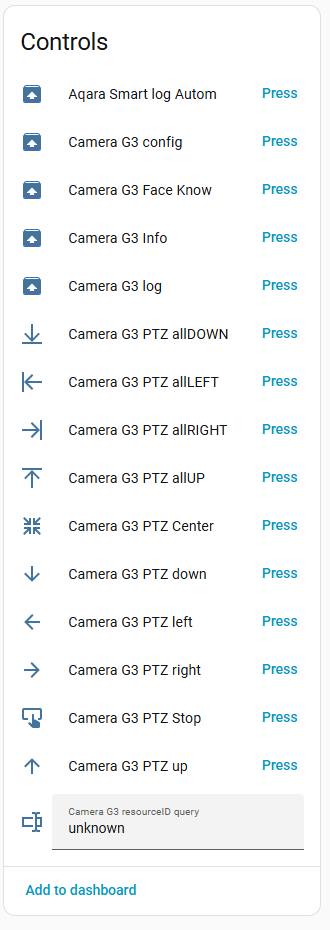
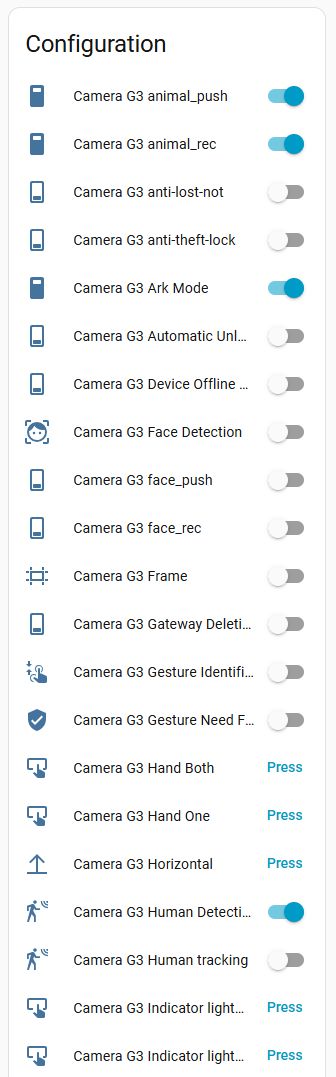
That’s just a small selection; there are 83 entities in total. Okay, not all of them are particularly useful, and some of the entities could be combined. But I suspect that, in the end, there will still be at least 40 functions that are only available via the API! However, that might be a bit too much for some users to handle 
4 Likes
talking too much for users to handle: Sometimes I’m blown away by the amount of entities some devices expose in Home Assistant  Or I lack creativity to find a good use case for them.
Even when bloating myself with more entities I’m interested in looking into the API you mentioned
4 Likes
I’d love to try to use the API can you tell me if this is local to the hub or through web based API that talks back to my setup through web?
2 Likes
I don’t use HA or Homey. Basically my partner wants only Apple home. She doesn’t even have the Aqara app. And since it’s her house (I only moved in a few years ago) then she dictates it. So no HA for us!
3 Likes
The Aqara Open API is a cloud-based REST API. It is not local to the hub. It uses HTTP requests over the internet to communicate with the Aqara Cloud, which then remotely interacts with your setup.
If you have an FP2 and/or a G3 Camera Hub, have a look at my post here: [Tutorial] Integrating Aqara G3 into Home Assistant with Video + PTZ
The author of the AqaraPOST Home Assistant integration uses an older version of the Aqara Open API (V1) together with Node-RED Companion.
You can find information about the Aqara Open API here: https://opendoc.aqara.cn/en/
1 Like
Using Apple Home is by no means a reason to avoid Home Assistant—in fact, it’s the opposite. The real magic happens when you combine them. Without Home Assistant, I wouldn’t have been able to integrate devices like the Ring Intercom or other hardware that lacks native HomeKit or Matter support. Home Assistant acts as the ultimate bridge: since it has an integration for almost everything, you can seamlessly ‘pass’ virtually any device through to Apple Home. This setup allows for advanced automations, like my Apple TV controlling the lights during movies or receiving laundry notifications on my HomePods and Apple TVs. Also, the Home Assistant CarPlay app is definitely worth a look for any serious user.
4 Likes
I do kind of agree. There are a lot of people who don’t want to go through the hassle of setting up and maintaining a Homeassistant server. I have one set up, but it’s too much work to maintain and keep updated compared to the big 3/4 (Apple, Google, Alexa, Smartthings) platforms. And it does sometimes crash at really bad times where I cant get to it to spend an hour fixing it.
And there are lots of Android users that don’t use Homekit Secure Video and can’t get rich notifications that way. It would be nice if they followed Reolink and simply allowed the camera to send you an email with the event photo captured.
You can then use an app like Pushover on Google Play which converts that emailed image to the specific pushover email they give you for your account into a push notification with the image. It’s a workground for Rich notifications and doesn’t cost Aqara a dime for servers, etc. And the app was all of I think $5 when I got for my Reolink cameras. It works for iOS too if you dont have an HSV subscription.
I think you are missing a lot of users buying Aqara cameras by not giving a way to get rich notifications with HomeAssistant or paying a subscription for non-Apple users (there are hundreds of millions out there).
1 Like
In my experience, Home Assistant is rock solid if it’s running on the right hardware. Most stability issues or crashes people report usually stem from using low-quality SD cards in a Raspberry Pi. I personally haven’t had a single crash.
You don’t actually need to deal with email workarounds or third-party apps like Pushover to get rich notifications on Android or iOS. Since version 2021.5, Home Assistant has unified this process. Both platforms now use the image: key, so you rarely have to distinguish between them anymore.
Android: The image is displayed directly in the notification (usually collapsed, but you can swipe down to expand it).
iOS: You get a thumbnail preview. If you long-press the notification (Haptic Touch), the full image pops up instantly.
alias: Camera Motion Notification
triggers:
  - entity_id: binary_sensor.your_motion_sensor
    to: "on"
    trigger: state
actions:
  - data:
      filename: /config/www/tmp/cam_event.jpg
    target:
      entity_id: camera.your_camera
    action: camera.snapshot
  - delay: "00:00:01"
  - data:
      title: Motion Detected!
      message: Someone is at the door.
      data:
        image: /local/tmp/cam_event.jpg
        attachment:
          url: /local/tmp/cam_event.jpg
          content-type: jpeg
    action: notify.mobile_app_your_device_name
4 Likes
I use Apple Home
2 Likes
Hi Gros, my personal experience was it was not hard at all to add to HA, just simply used the generic camera integration and enabled the rtsp stream in the aqara app for the aqara cameras. Have you tried using the generic camera integration?
1 Like
Ok but “just use HomeAssistant stupid” hip thrust while calling out Homeassistant Paul Hibbert style isnt the point or the answer.
I have it set up and scripts, so I know how to do it, but dont necessarily want the routine maintenance duties of fixing extensions that break/need updating 1+ times every week. Nor the issue leaving the house or for a trip and it goes down not able to get notifications, which the commercial platforms dont really have (once in a blue moon sure). No one who uses HA says it is set it and forget it.
Lots of people don’t want to use it; there are only about 400-600k HA users total, a relative niche platform in comparison. Aqara are a consumer products, not an ESP32 nerd gadget. It should at least be an option from Aqara for the general public. That would not hurt anyone else or HA users to have more options.
Companies like Reolink do it (the method I mentioned to get emailed and pushed event images without HA), plus MUCH better HA integration (their own module that exposes a ton more entities than Aqara via Homekit which is the feed, doorbell push, and general motion without syncing Matter signals via the Aqara app for person/package detection and a messy way to do it) for about the same $100 for a doorbell.
It’s certainly possible to offer all options to the user. A basic way to get rich notifications without paying a subscription or HA wouldnt hurt anyone; and not putting package/other basic detections behind a paywall when its done on device.
1 Like
I have to respectfully disagree with the idea that commercial platforms are a ‘set it and forget it’ paradise. That simply doesn’t exist. Whether it’s Apple, Google, or Windows, you will always have to deal with updates and the occasional breakage.
The real difference isn’t the lack of maintenance, but accountability and recovery:
- The Backup Advantage: This is the killer feature for me. If you accidentally delete a complex automation or a set of rules in Apple Home or Google Home, they are gone. There is no easy way to restore them quickly. With Home Assistant, I have full snapshots. If I make a mistake or something breaks, I can revert to a previous state in minutes.
- Automated Maintenance: My HA updates are fully automated, and I haven’t had a single crash. The idea that it requires ‘weekly fixing’ is a myth if you have a solid hardware foundation and a clean setup.
- The Windows vs. Linux Factor: We’ve seen this debate for decades. People pay for Windows, yet it still requires constant updates and professional admins to fix issues caused by those very updates. Closed systems aren’t inherently more stable; they just give you fewer tools to fix things yourself.
- The Cost of Refinancing: We have to be realistic: Companies like Aqara or Reolink have to refinance their R&D. You either pay a high upfront price, pay with your data, or pay a monthly subscription for features like AI detection.
Home Assistant is simply the Open Source alternative (like Linux) for those who prefer to invest a bit of time to gain total autonomy. Aqara is actually great because they give you the choice: use their app, Apple’s cloud, or HA. If you don’t want to pay the ‘subscription tax’ or the ‘data tax,’ you can choose the ‘maintenance path’ with HA.
Ultimately, it’s about whether you want to be a tenant in someone else’s ecosystem or the owner of your own. Both paths have their price—one is paid in money, the other in time.
And even if Reolink currently handles certain things better than Aqara—I can’t really judge that, and the comparison is a bit of a stretch anyway. They are two completely different companies with different focuses: Reolink is a specialized surveillance company focusing on dedicated hardware like NVRs and open protocols (RTSP/ONVIF) to compete with security giants. Aqara, on the other hand, is an ecosystem generalist built around Zigbee sensors and total home automation.
Whether Reolink will maintain its local-first approach in the long run is another question entirely—we’ve seen many companies start ‘open’ only to move features behind a cloud paywall later once they reached a certain market share. Ultimately, the decision for a platform won’t come down to just one specific feature or notification method.
3 Likes