Is this a common problem for those of us trying to write automation rules for IR accessories controlled by M3, whereby we are frustrated by not being able to tell what “state” the accessory is in at any point in time?
Can Aqara allow us to create “state” variables that can be associated with these M3 controlled IR accessories, which can then be incorporated into the automation rule in coming update for M3?
No, this is not possible because Infrared (IR) is technically a strict one-way street: The Hub can transmit commands, but it cannot receive any feedback.
For Example:
The Hub sends the “Power On” command. (Hub assumes: State = ON).
You press the physical power button directly on the TV to turn it off.
The TV turns off but does not send any signal back to the Hub.
Result: The Hub still thinks the TV is ON, even though it is actually OFF.
If you only need an on/off variable, you can activate or deactivate an unused automation. You can then use the status of the automation in the IF query. However, as already mentioned, this method is not reliable, especially if you still want to use the original IR remote.
Thanks for the reply. That is precisely the problem that the “state” variable will solve. Let’s say M3 allows me to create a TV state- variable after i have created an IR child for the TV, every time i use the M3 to turn the TV on or off, i can also trigger the TV state-variable to a ON/OFF state. With that state-variable, i can now use that in the automation rule … WHEN tv-state-variable is ON …
That will allow us to have more play with these M3 IR bind accessories in the automation rules.
As I mentioned in my previous message, you can easily query the status (active or inactive) of an automation in the ‘IF’ block. And in the ‘THEN’ block, you can set the automation’s status to ‘active’ or ‘inactive’. This essentially equates to a ‘state variable’. In programming, this is also referred to as a boolean variable (true/false).
But then, you can only change the TV’s status (on/off) using the M3. As soon as you use the original TV remote control or press the physical switch on the TV itself, its status changes, but the status of the variable does not.
If you want a perfect solution, you need to query the real status of the TV. This would be possible with Home Assistant, for example. The real status could then be passed through to the Aqara Home app via Matter. The status of the TV could be determined with an ICMP ping. It could also be determined with Bluetooth. If you have an Apple TV or smart TV, you can query the status directly.
Yeah it’s stupid that Aqara doesn’t have variables, I agree. People are focusing here on the risk that the state variable no longer tracks the device, but I’m sure you know that.
You can flip the whole logic here and instead use “fake variables” built from the enable/disable state of an automation. @gafich10 can explain you how or you can search the forum for my posts.
Then you have to write the tv on automation like this
TV on → change fake variable state
Then another automation
When fake variable automation state changes → TV on/off
I should add, once again. That this fake variable thing via automation enable state is a gross hack and should just be implemented by @AqaraOfficial like has been repeatedly asked many times!
@nzjrs However, I consider the usefulness of status variables in relation to IR devices to be very limited. There are more important areas on which to focus. Presumably, the programmers need to prioritize their tasks.
Yeah, I noticed we wrote our posts at the same time ha.
But fwiw because Aqara does not add features to already released products (preferring to release new updated products), I actually think improving automation is a good way to add capabilities to all products. Fingers crossed I guess.
Hello, Happy New Year 2026, nice to hear from you.
You didn’t understand me, I use the usual automation for the wireless button, one press - On, double - Off
Noted that it is a long, known issue and sad to hear that Aqara has not listened to the forum and address it.
Firstly, my use context. Only started with Aqara for 3+ months. Intention is to make electrical item already existing in the house “smart” with minimum need to reconfigure, add on or change them; and to keep it simple within one eco-system (yes, i am aware of the power of HA, etc … i want to keep it strictly within Aqara capabilities, if possible). I am sure many of us here have plenty of existing electrical items based on IR controller that the we would like to add into our “smart home”. So, Aqara should not ignore us as just a minority user group.
Secondly, when i see “automation … when-if-then…”, it brings back hope that i can do “smart home automation” like what we can do with programming languages. That is why i raised the question of the lack of user assignable variables. Clearly, it is in Aqara interest to make the brand better known as the one has more powerful capability compared to its competitors.
After all, “automation/scene” is what makes Aqara suite of product smart, Aqara has everything to gain and nothing to lose to focus more on making it automation features richer and more powerful.
Aqara, thanks for your effort to bring more and interesting products to us all the times but do not neglect the software and their features that make all these products more useful and better for us, your end-buyers.
Aqara, hope you are reading this posting threads and respond to it.
And to all that responded to my post, wishing all a productive and interesting 2026.
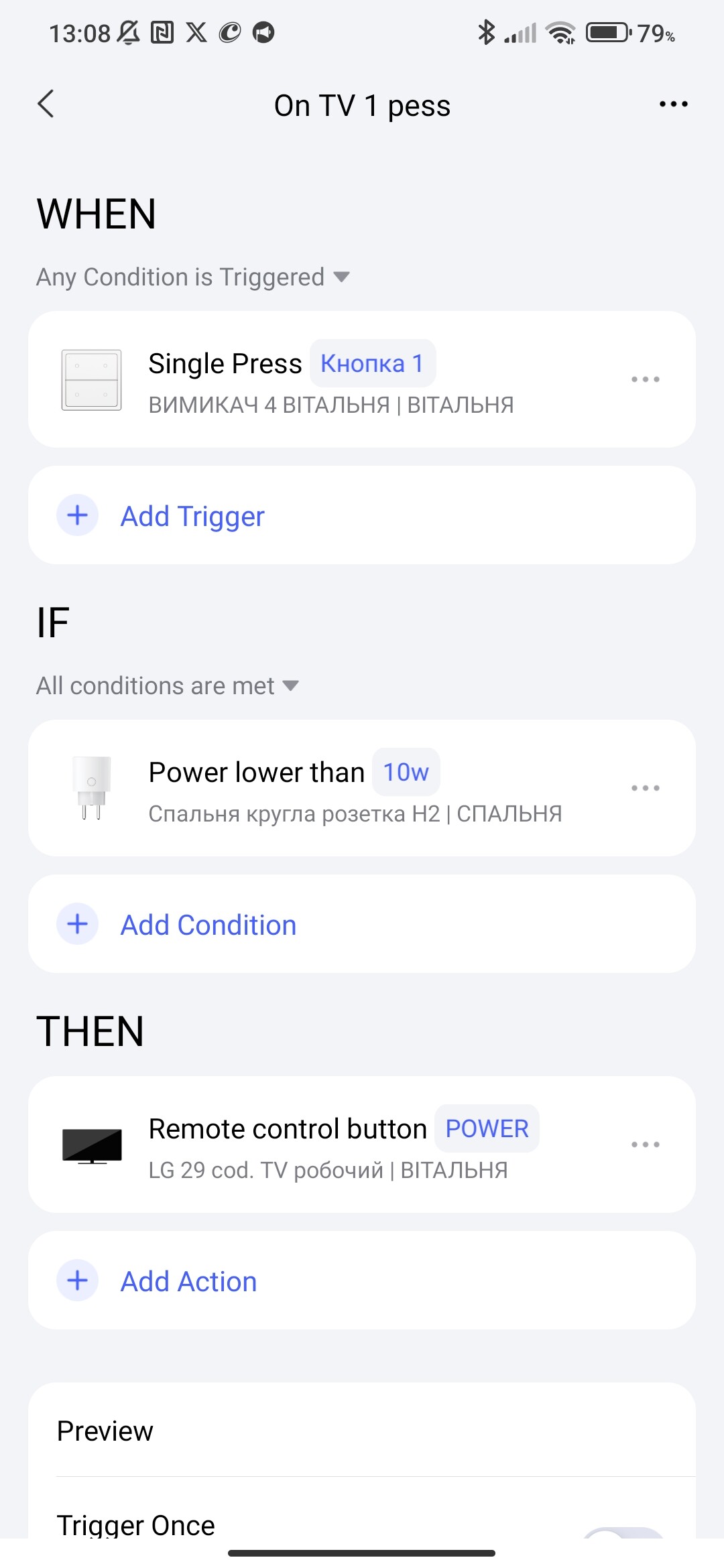
gafich10 has already shown us that this is possible. You can read the actual status of the TV with the help of a smart plug from Aqara. In your use case, this works much better than a variable that does not know the real status of the device.
Aqara did this not too long ago with the introduction of Automation 2.0, and I think there’s more to come. Let’s wait and see.
Actually, I’m wondering if ‘bi-directional’ is the right term here? To my knowledge, standard AC infra-red controls are strictly uni-directional. The AC receives commands but doesn’t send a status confirmation back to the remote or hub.
That would also explain why the App status can be incorrect—it is essentially guessing based on the last sent command (‘state tracking’) rather than receiving real feedback from the unit. Or do you have a specific AC model in mind that actually communicates back via IR?