Hi all, using Zigbee2MQTT I updated my W600 to the available firmware, i think is v0.0.0_2644.
The problem I reported here is fixed
@Solmath I think it’s the first issue in your list
Hi all, using Zigbee2MQTT I updated my W600 to the available firmware, i think is v0.0.0_2644.
The problem I reported here is fixed
@Solmath I think it’s the first issue in your list
New firmware landed today… let see if it starts working now.
And… How does it work?
After 2 days, no difference to before. Set 20 degrees, room temperature 18 degrees, heating body remains cold.
The same with me on the old firmware (still no new firmware update available at my location). Room temperature 18 degrees (also on an external thermometer), the thermostat set to 20 and not heating.
After doing a better test, I confirm this issue is still not resolved with the latest firmware: the W600 still opens the valve when off.
Using z2m to control w600 devices. Has anybody spotted 0.0.0_2745 download url yet? @LikeMike Unfortunately, I don’t have an Aqara hub, so I can’t capture the URL
Since Matter firmware requires review and approval from the DCL server, you can update the Matter firmware by switching protocols. The specific steps are as follows:
Mine are still useless with the new firmware. Today one has shifted its clock back one hour again, meaning that schedules are one hour late. This has been a problem since delivery. Both still heat when they are not supposed to do so. The other day one of them decided not to heat to the schedule set temperature although its own sensor knew the room was 4 degrees below the wanted temperature.
So all in all it still doesn’t work! 
As I mentioned, I use z2m (zigbee2mqtt) to control the W600. I don’t use the Thread firmware. May you provide the download link for the latest zigbee firmware so that users without an Aqara Hub can also update?
If you don’t have an Aqara Hub, you can first switch to the Thread protocol, then switch to the Zigbee protocol to complete the update.
Can you please tell us when this became possible?
I emailed Aqara Technical Support to ask about this and the response on 6th of January was this:
„Regarding your question about updating the Zigbee firmware without an Aqara hub, unfortunately, firmware updates for the W600 in Zigbee mode require an Aqara Zigbee 3.0 gateway (with version 4.3.8 or higher). The protocol switching (between Zigbee and Thread) does not trigger a firmware update.“
With the new firmware that was released a few days ago in march, I’m still having lots of issues with smart schedules not responding when they should. It’s said this was fix but it’s not. Still a major issue!
As the temptation has been warmer the last week or so iv not been able to full see if the radiator valves hold better temperature and have less delta when swings between them provided heat and not.
After a few days of testing, I can say there is a slight change. It is hard to evaluate the valve, and moreover it’s difficult to test it properly now because it’s spring. Looking at the temperature graph, there were several days when it seemed to work as intended, and on other days the temperature spikes were smaller. It appears that when the temperature is close to the setpoint the valve works OK, but if the temperature drops about 2 °C below the setpoint at night, it does not start to open until a few hours later and then opens fully to reach the setpoint, causing a large overshoot. It seems there is some hysteresis, and any hysteresis disrupts PID control. I do not understand this design choice. Is it possible for me to tune the PID parameters myself? Are there plans for further improvements to the control algorithm for W600?
So iv been testing as well. My issue with the smart schedules is a strange one. Some days they work other days they didn’t. One day they will all run just fine then for some reason the next day some of my w600’s like “lock up” and no longer response to the schedule untill a manually intervention and then cancellation. This seems to reset them and it allows the smart schedule to work again for maybe a day or 2 before "locking again.
Temperature holding appear to be a bit better, but this is getting harder and harder to test as we come into spring. I can confirm that if a room is sitting at say 18C and you want it at 19C the valves don’t appear to open and heat the room. My radiators remained cold untill. I presume this is because the value is maybe only opened 5 or 10% as it’s close to the final temperature to try and stop an over shoot in temp.
This does appear that small ish temp adjustments are still not really possible. It work if you need to first heat a room, but after that unless your making large changes 2+ C changes there still is not much improvement there.
Maybe there is a better way to handle the logic where by if a temperature change is requested the valves open to 50% no matter what. Then when it’s 0.5C away from the target it closes the valve down to 15% or something and lets the radiant heat stored in the radiator do the rest in a way to not over shoot. If the target is hit then close to 0%. (This has it’s own problems as I will explain)
I feel like the percentage opens should be directly tied to how far from the target value you are once your within 0.5C of your target temp. What iv seen from the W600’s iv got in Home assistant is that they are but they are also not. They often just from 30% to 0% then from 0% to like 18% or 30% when trying to maintain a temperature.
The big issue here still is that 15% open for one radiator does not mean 15% for another radiator in terms of get heat to it. Again I can see this with the 2 W600’s I have in Home assistant. One radiator at 15% valve open gets heat, while the other does not get heat. It starts getting hot at about 18 to 20% open.
I don’t know just brain storming here hahah.
Over looks like some improvements, but still got much more work to go I would say.
Yes, we have added support for reporting the “valve opening percentage.” As you observed during testing, it now makes fine adjustments to prevent overtemperature. The logic you proposed has been very helpful—our algorithm engineers will add a set-based algorithm instead of relying on slow fine-tuning.
So that means its coming a new Firmware? When is this ready? I have 5 W600 and at the morning they dont Heat Up. Feels Like they are stuck! When i callibrate new then they are heating. I also have 4 W100 and i think they dont Work flawlessly togther. So i need a new Firmware or the W600 are totally useless.
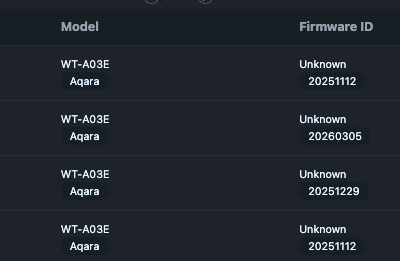
So I got 4 thermostats running with Z2M. I force removed them all, swapped them to Thread and back to Zigbee.
I still cannot perform OTA updates, FW is still -1 and when I try to update, it fails to respond.
In the OTA screen I see the datestamps, but its all over the place. The reset was performed same day one after another.
Not sure this technique is very reliable. Is the a URL that can be used to pull the FW?
Where can I find the valve opening percentage?
Omg can we finally control valve open percentage directly!? From automations?