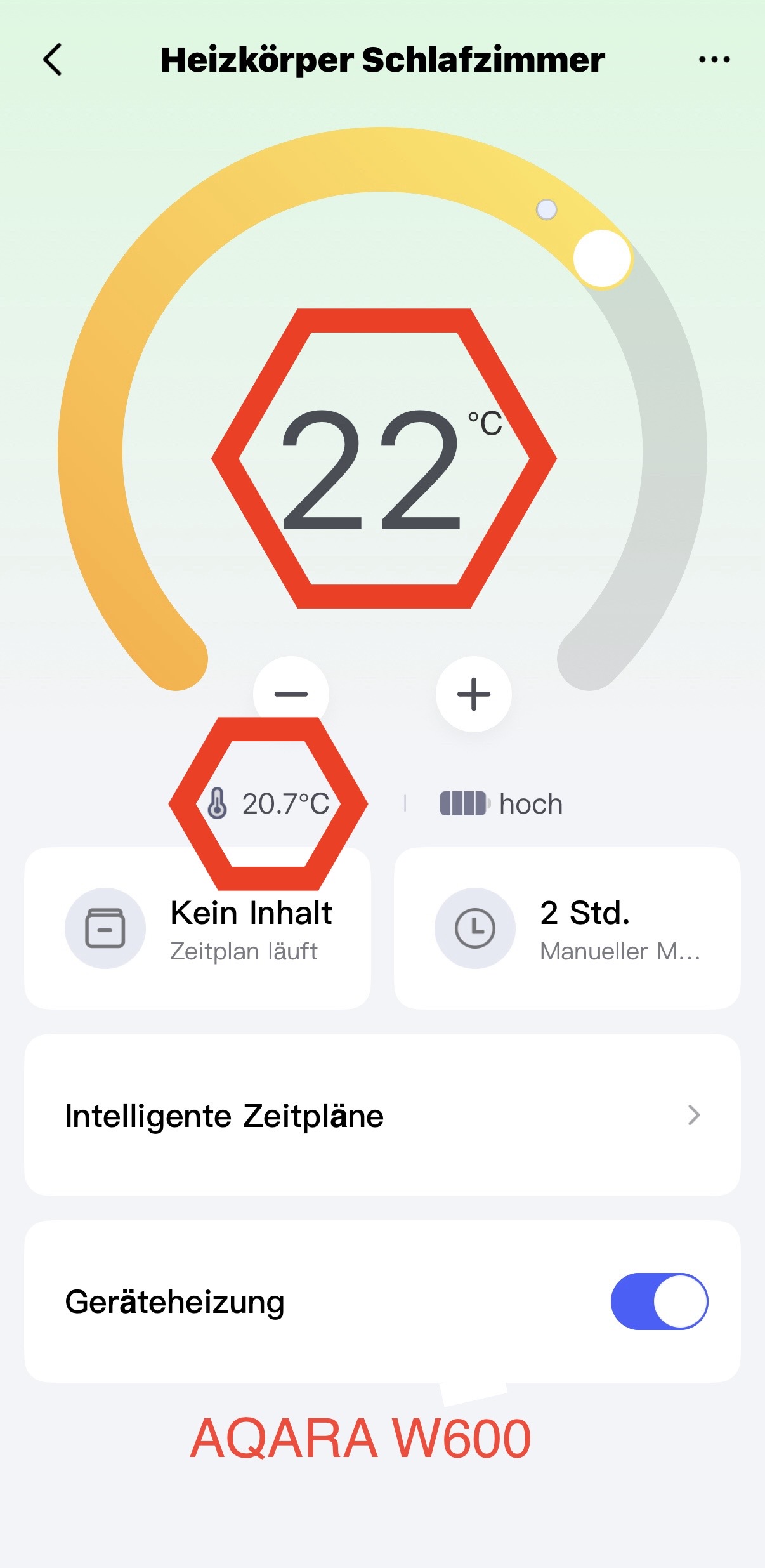
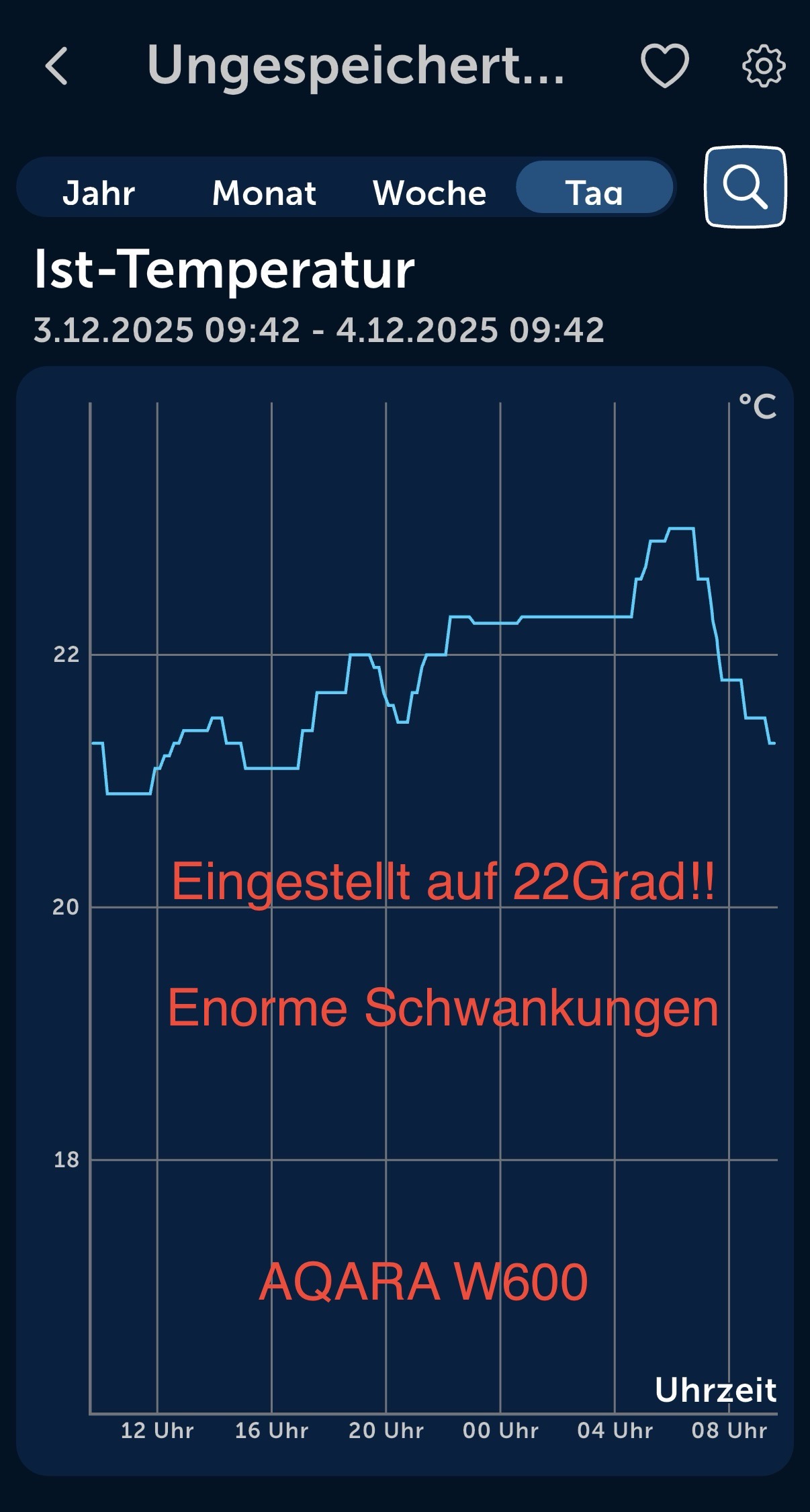
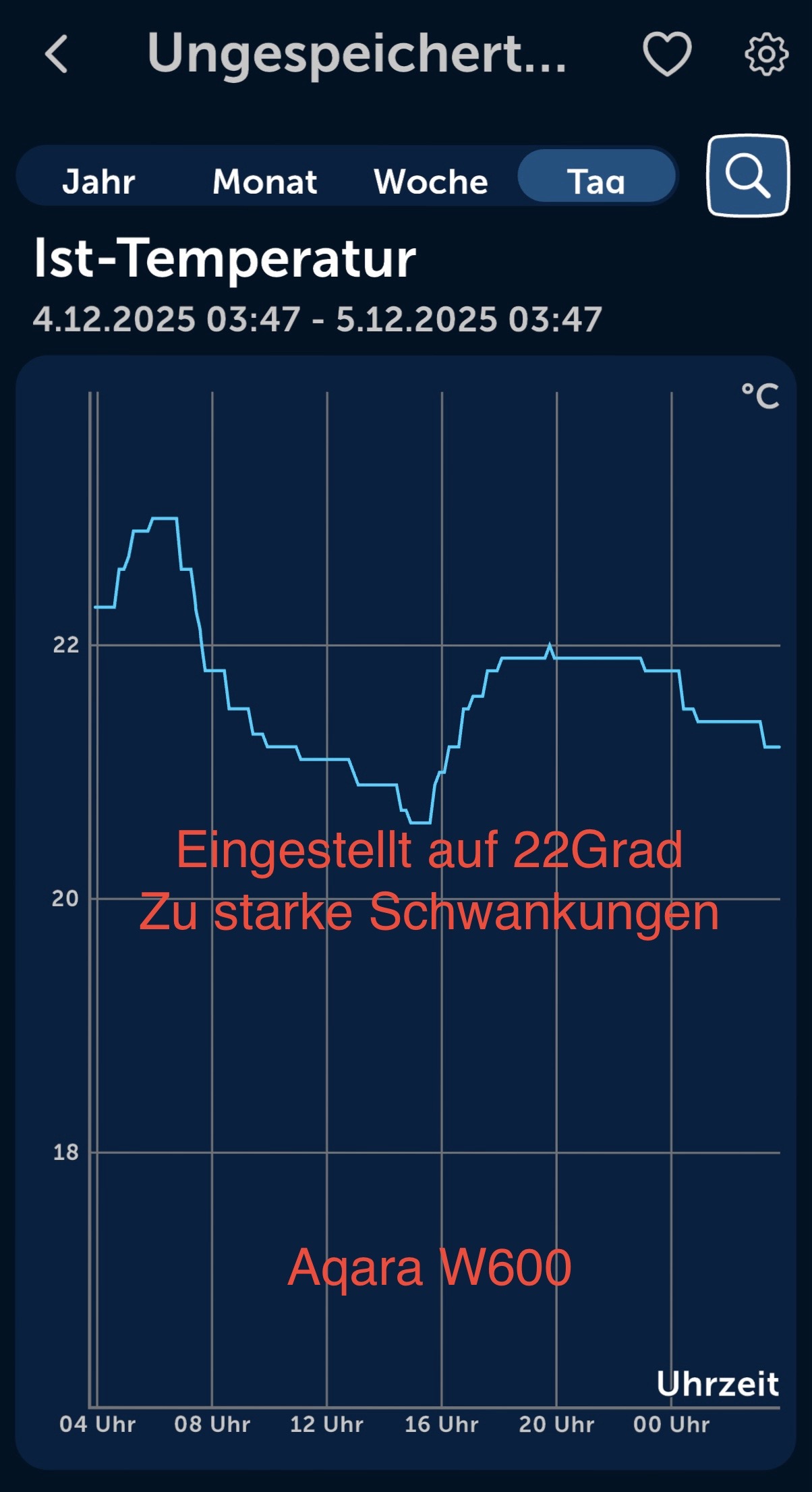
What’s wrong with the thermostat?
The temperature fluctuates extremely.
W600
and
Tempsensor T1
set to 22 degrees
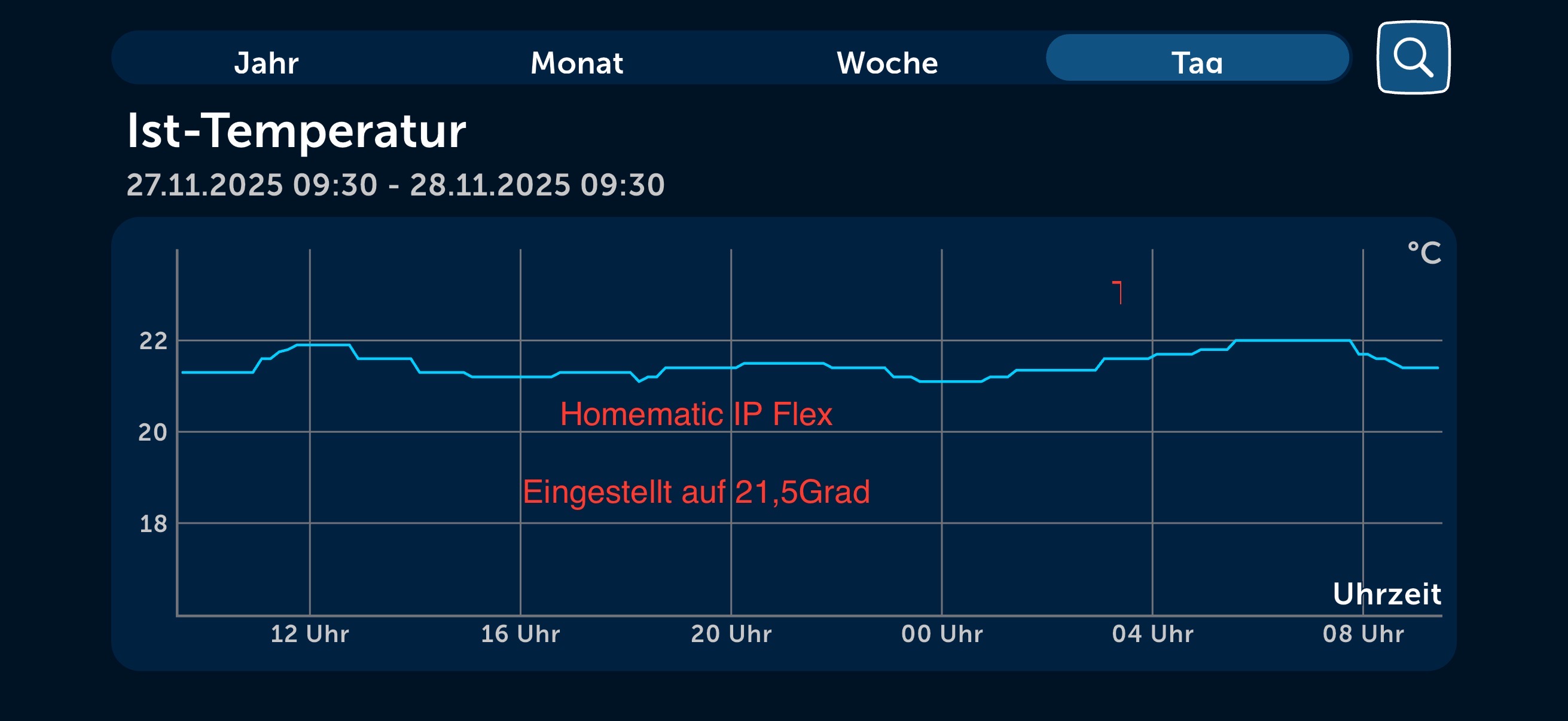
The situation is significantly better with Homematic.
What’s wrong with the thermostat?
The temperature fluctuates extremely.
W600
and
Tempsensor T1
set to 22 degrees
The situation is significantly better with Homematic.
Same issue here, I have already posted my detailed observations in this thread:
There was supposed to be a firmware update this week, but since it’s already Friday, I assume it has been postponed.
In the meantime, I started testing the Tado X, and so far it performs significantly better, even without using an external sensor.
This is actually quite disappointing, because I really like the design of the Aqara W600, and it is also extremely quiet and barely noticeable in daily use.
At the moment, it feels like the W600 may have been released too early, and could have benefited from more time for software refinement.
Same problems with my w600 even with external temp sensors. They do what they want! Sometimes its much too hot and heating is still on and sometimes its cold and heating is off. Even without any plan in manual mode.
I have no control about temperature in my flat and also think about sending everything back.
Also, manual changes seem not to be sent to the w600, the delay sometimes lasts minutes though all have good signal
My W600s all lose temperature measurement ability or reporting every day, and this happens multiple times a day on Matter. I originally thought perhaps they stop reporting it, are disconnecting or potentially it’s going to cloud and the server was dropping off.
I expect this is one of the reasons your performance isn’t great. You can compensate the read temperatures from the app if it is consistently under or over reading, but that won’t help you if the product isn’t working!
However, my M100 hub is connected to internet and the connection to W600 is fine, because when you turn the W600s off on the app when this happens, they then turn off and turn back on. This appears to re-establish the temperature reading or reporting capability, although no history is displayed, (so you get a straight line from the last temperature point to the reconnected one).
This happens multiple times a day and some of my rooms get hot because of it. With no temperature reporting updates displayed, but the room getting hot, this feels like a pretty fundamental W600 firmware issue to me. (If room temp. was maintained even when reporting failed, then I’d have confidence the W600 firmware was still taking readings, but that the reporting of those temperatures was just failing).
In addition to permanent failures, it also looks like there are multiple successive dropouts then recoveries, (you see a series of sharp spikes and drop all next to each other. Like 10 or 20 spikes compacted together). You occasionally see a random single spike too whilst reporting is working, which suggests some functionality issues, (temp doesn’t rise like that then return back to an identical cooling gradient as it was on before the spike).
This needs fixing asap. You can’t even schedule hourly resets. You can turn them all off, but you can’t turn them back on like you can on the app, (to the previous set temp). You have to specify a temperature to turn each one back onto. Then I’d have to go back into every one and choose the temp I want it to set to for every hour it turns off then back on … Or set 24 separate reset schedules… I don’t have the time to do that or maintain that for a missing schedule feature or for a product that isn’t doing its prime basic function.
Aqara, when will this get fixed please? We need a date. Thank you.
To follow up, I’m seeing over 200 device reboots on a single W600 due to watchdog timeouts.
This means that a process or piece of hardware is likely failing to act in an expected manner. When it works as expected, it resets the watchdog timer.
If it fails, the watchdog timer doesn’t get interrupted or reset and so it times out.
When the watchdog times out, this automates a software reboot to try and restore functionality. It’s kind of an automated turn it off, turn it on again process to try and recover from disasters like infinite loops.
With this happening over 200 times, I’d expect it to more than likely be a bug in the firmware code. It’s possible that it’s due to a hardware design or component issue, but I think that’s less likely.
When I locate a frozen and unresponsive W600, it displays the incorrect temperature, which is the same value as the last one logged on the graph before logging freezes. So the incorrect temperature from a few hours back displayed on the device plus the fact that it does react to a locate command also suggests to me that the W600 is crashing, rather than a Hub communication issue or something further down the line.
The impact of multiple watchdog timeouts is that the device will likely keep rebooting, so it won’t be working during that reboot, reconnection and any required calibration time. In addition, it also likely won’t work from the time it actually fails, (the root cause), to the time it takes for the watchdog to time out, (the time to “recognise that a failure has occurred”).
So here’s another example of how the thermostats are currently doing whatever they want and I no longer have any control over the room temperature.
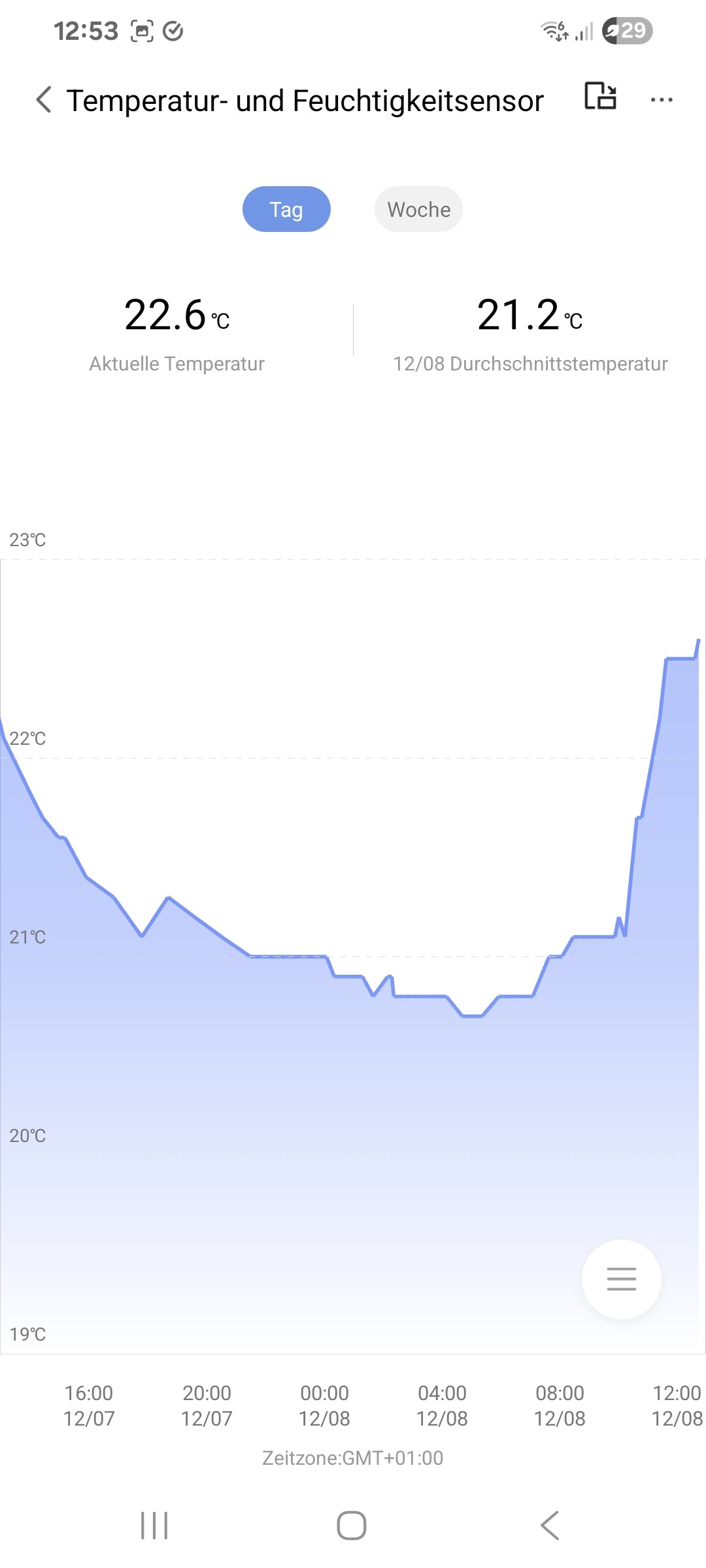
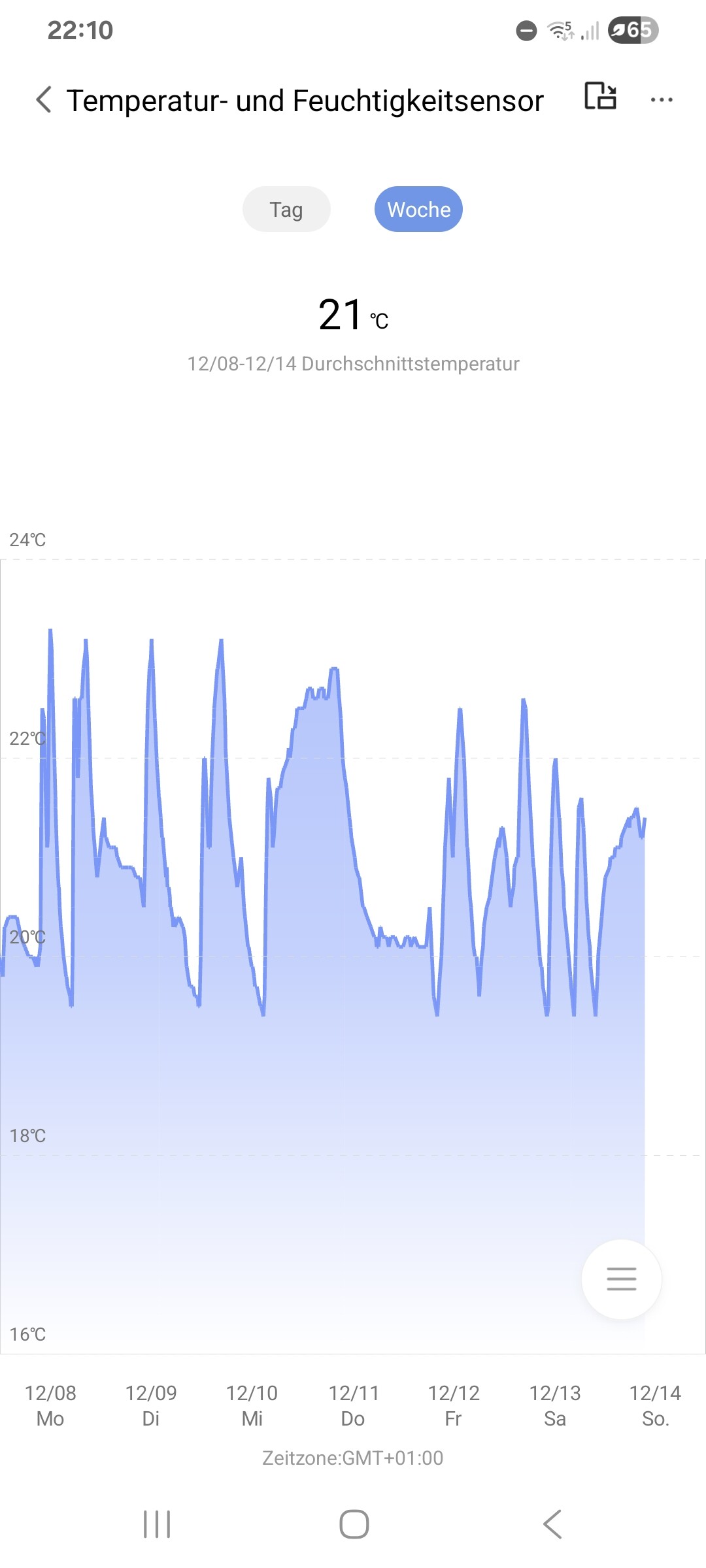
The temperature in the living room is set to 21.5 degrees (manually, not via scheduling, as that does’nt work better) and an external temperature sensor is connected.
The room temperature fluctuates between 20.5 and 22.6 degrees, even though nothing has changed. There are two heaters in the room, both of which are heating even though the target temperature has already been exceeded by a long way.
Sometimes only one of them heats and the other is cold, even though both are assigned to the same sensor.
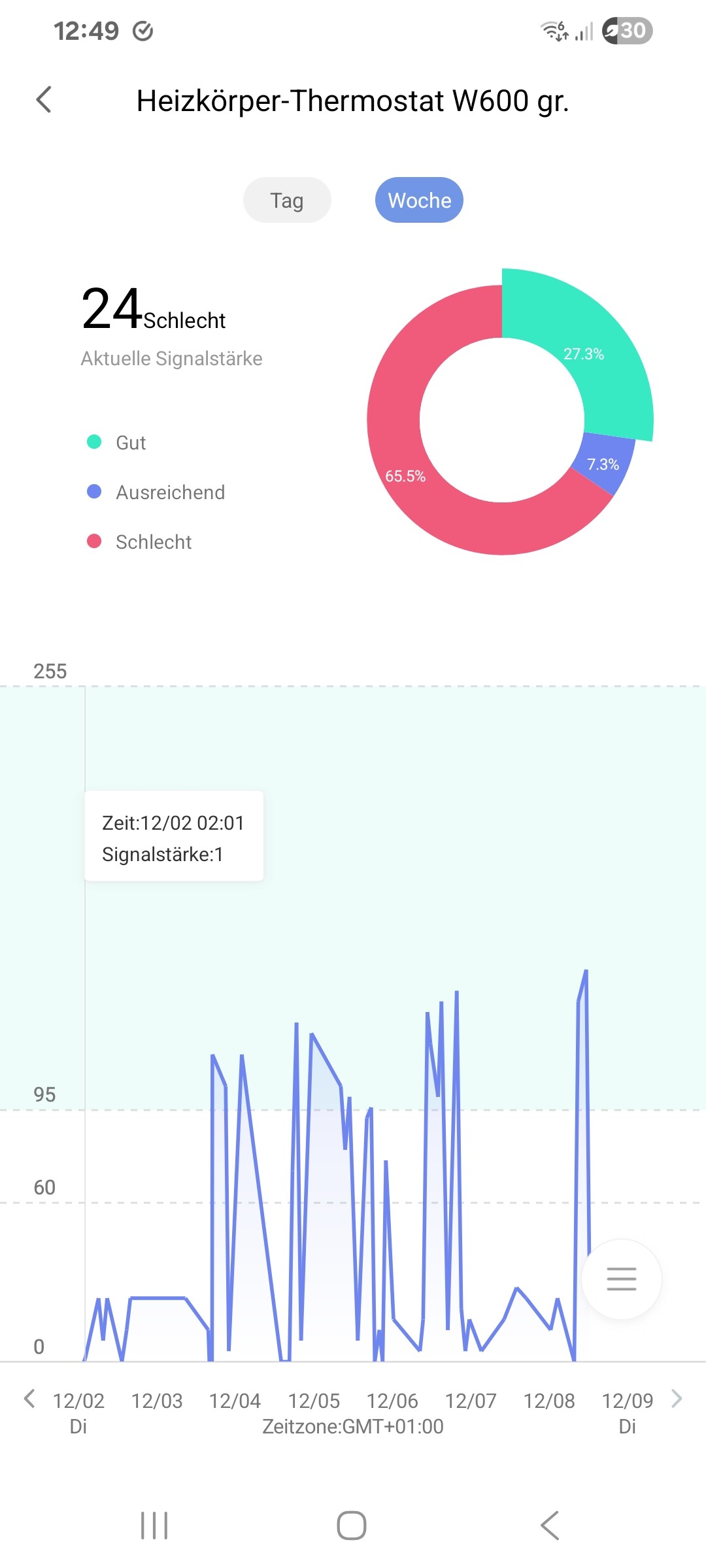
One of the thermostats also has strong signal fluctuations, even though I have placed a Smart Plug 3m away in a direct line and the signal should be perfect at all times. I therefore replaced this thermostat to rule out a defective device.
However, the new one is also causing problems, as the firmware update from 0039 to 1839 could not be installed several times.
EDIT: Now installed, although it was not documented as successful in the profile (firmware log). This does not seem to be the case in general, only visible on the hub or smart plug. Intentional?
And so it is throughout the apartment, sometimes it is too cold, sometimes too hot. I don’t even need a schedule; for a start, a consistently reliable temperature would suffice. Smart is different!
EDIT2: Last night, the W600 decided to turn the heating up to full blast, and I woke up drenched in sweat!
If things don’t improve this year, I’ll be forced to return all the thermostats.
I am experiencing the same.
Here are several issues:
Overall it is terrible and not usable, the calibration is completely off. I tried all settings and see no improvement.
I am considering to return it.
I had completely the same issues. Just heating to very high temperatures in the morning out of nowhere.
Sometimes not heating at all. And usually always heating full power, when it starts heating.
So Aqara, what are you doing about it?
@nick_k You seem to be experiencing an issue with temperature fluctuations, heating control problems, and firmware update/signal issues with the W600 thermostat. You can contact customer support for assistance.
Contact the Aqara Home App Customer Service Team (Home > Help & Feedback > Customer Service) or scan the QR code:
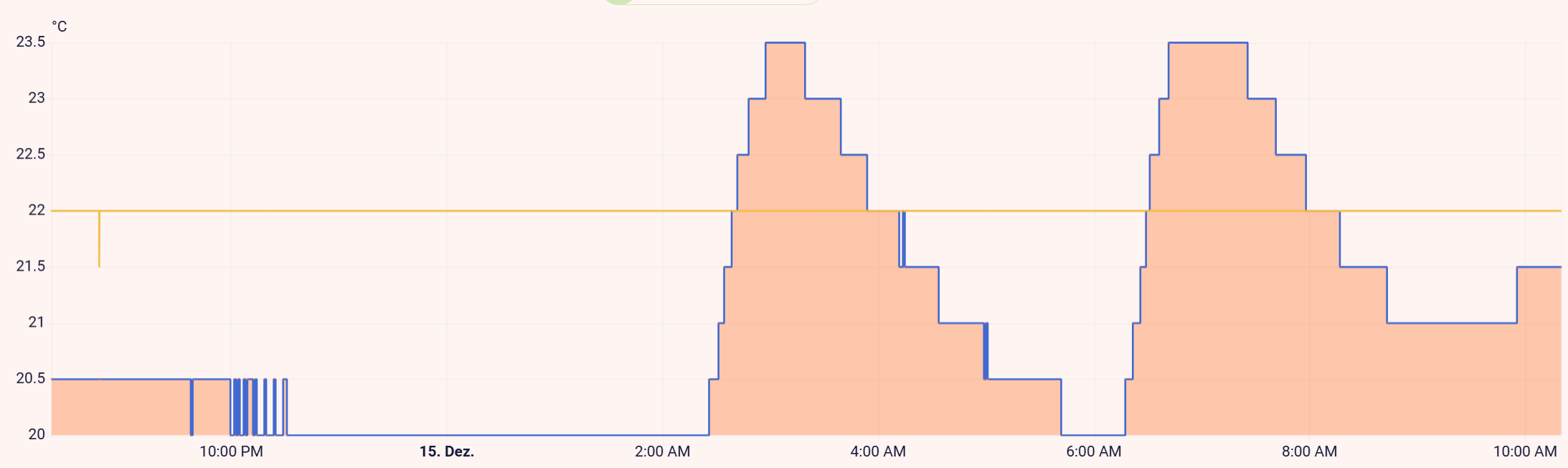
Similar issue here. The target temperature (yellow) is set to 22°C but the W600 seems to keep the valve fully closed until the internal temperature (blue) drops below 20°C. Then it opens the valve until it reaches the set temperature, overshooting quite a bit.
This is not an acceptable controller behaviour for a TRV.
I’m on Thread firmware 1.0.0.0 using Home Assistant with the Matter integration.
I opened a support ticket, let’s see how they respond.
Hello, yes, you described the adjustment process completely correctly. At the moment, intensive adjustments are being made to the new firmware to fix this problem.
Hi @gafich10, thanks for the quick response. Do you have an estimate of when this new firmware will be available?
I don’t want to mislead you, but work on it is in full swing. I know for sure that its release will not be delayed.
I want to know if the temperature fluctuates like this all the time, or only for a short period after the equipment starts working.
Same problem here, set up an automation, does anything but does not work properly. Today, I manually set all of them to 22° - guess what, my toilet is at 17°, my bathroom at 18,5°, no heating at all. My bedroom is at 22° luckily, had a hard weekend sitting at about 18-19°. 
Please fix the W600, they could be awesome devices if they at least would heat if needed. For me, I dont even care if they are 1° above the set temperature but sure, this also should be fixed.
I now have a thermostat that is not turning off. No matter if I turn it down, turn it off or whatever. I bought these to save energy not use more energy @AqaraOfficial @AqaraBot
@nick_k You seem to be experiencing an issue where the thermostat won’t turn off despite adjustments. You can contact customer support for assistance. Contact the Aqara Home App Customer Service Team (Home > Help & Feedback > Customer Service) or scan the QR code:
I bought several Tado X thermostats on Black Friday. Unfortunately for Aqara, they performed significantly better than the Aqara W600, even without using an external temperature sensor. Because of this, I ended up returning the Aqara W600.
I’ve since added Tado’s Wireless Sensors X, and they work perfectly. The temperature deviation was only between –0.2 °C and +0.8 °C compared to the set temperature, which is excellent.
The open window detection also worked reliably every time. It usually detected an open window within 30 to 120 seconds.
The only thing I really dislike is Tado’s subscription model for features that, in my opinion, should be free. Additionally, the Matter integration is quite limited, the app is still required for some essential features.