Trying to set up an automation as follows - snow sensor triggers switching #1 input on the T2 module. This closes the output #1, starts a countdown timer, once the timer is out, it opens the output. How do I avoid the timer from restarting if the input opens and closes before the initial countdown timer has timed out.
Which system do you use to start the timer, or in which system was the timer defined?
Regardless of the system and purely from a logical standpoint, I would say:
if Timer <= 0 then start Timer
Or do you want to know if you can build a timer with the Aqara Home app?
1 Like
Thanks for the input, I am brand new to this and all I know is the home app, and in terms of the system, I am using Hub M200. The programming seemed pretty primitive, I wasn’t sure if that was the extent of it.
So if you mean the Apple Home app, then you’re right, there aren’t many options.
There are more options in the Aqara Home app, but you can’t set a timer.
What you’re describing would be possible with Home Assistant, but that’s not for beginners.
1 Like
Hello, welcome to the forum. Automation 1.0 and 2.0 have a “one-time” function (toggle switch). After starting, the automation turns off. You can schedule the start of the automation with another automation, for example, 06:00 hours, or if the snow sensor is “dry” for 1 hour.
1 Like
I am currently using the Aqara home app.
2 Likes
Then you have no problem with your automation, it can be done without any problems.
1 Like
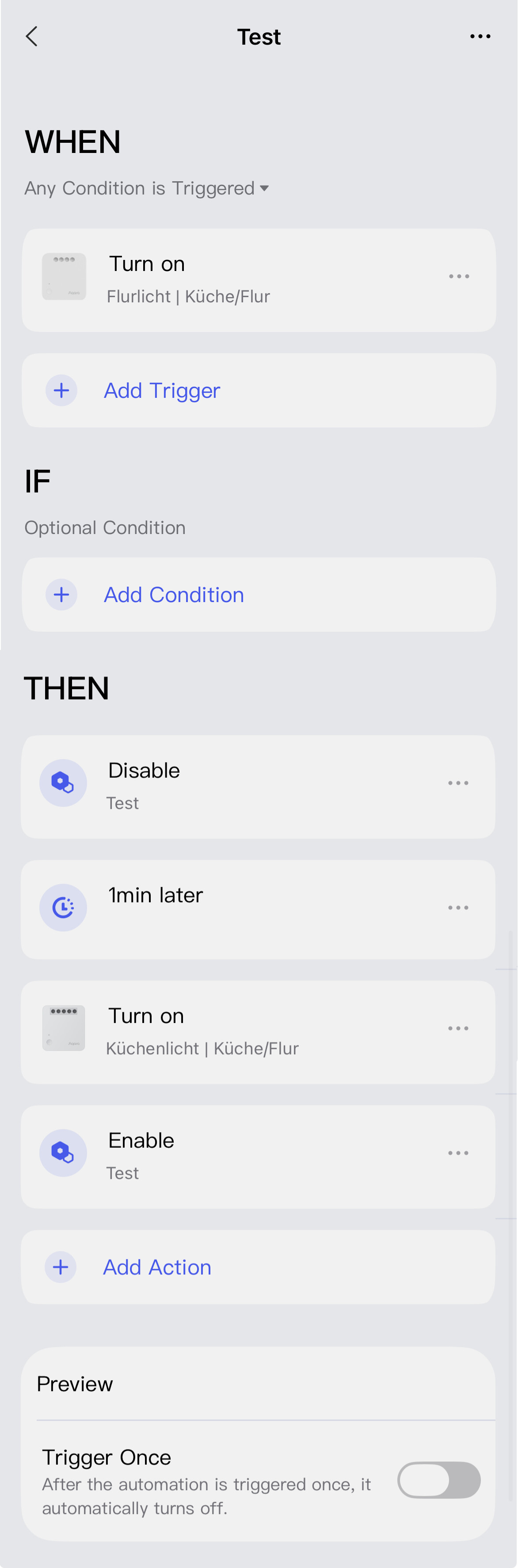
Thank you for the info, I don’t completly understand but I will play around with it more.
I haven’t seen an option to add a “when” condition, only if and then
Read here, there a description of how to switch to automation 2.0
Be sure to carefully read the explanation in the second part of lesson 1. This will help you program without errors.
4 Likes
Super, THANKS!
3 Likes